

All About the Service Hub
The Service Hub is where you start with the fuentis Suite, above all when you are building and running an ISMS to ISO 27001 or BSI IT-Grundschutz.
Finding your way around
Section titled “Finding your way around”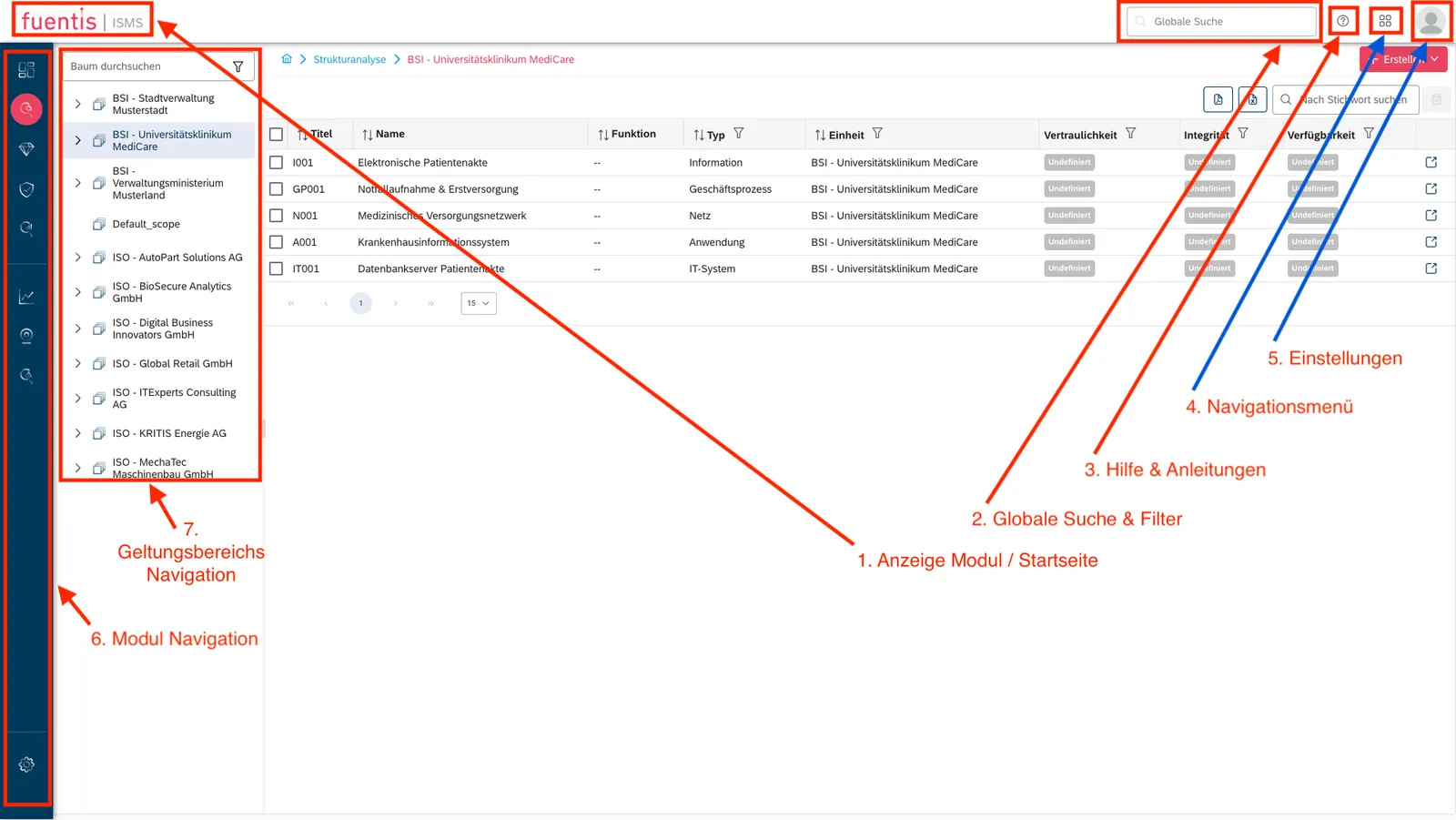
The interface has seven areas:
1. Module display / homepage Your personal start page, with widgets for whatever you need at hand.
2. Global search and filter Searches the full text of everything in the Suite, with filters to narrow it down.
3. Service Hub menu Opens the guides, quick-start material and background articles.
4. Main navigation Switches between modules: ISMS, BCMS, the support modules.
5. Settings Language, dark mode, profile, password, two-factor authentication.
6. Module navigation The blue sidebar moves you around inside a module, for example to the risk analysis or the gap analysis.
7. Scope navigation Switches between scopes and security objects. Searchable and filterable.
What a GRC/ISMS tool is for
Section titled “What a GRC/ISMS tool is for”Picture your organisation as a castle you need to defend. To do that you need to know three things:
- What is worth protecting?
- What threatens it?
- Which measures actually help?
The fuentis Suite answers those three as one system:
- Governance — who is responsible for what, and by which rules
- Risk — finding and rating risks systematically rather than ad hoc
- Compliance — the evidence that you meet the requirements you are held to
A pragmatic way to start
Section titled “A pragmatic way to start”1. Start on paper Sketch the frame before you touch the tool. What should your ISMS cover? Where do you draw the first boundary?
2. Create a scope For example: “We start with the Hamburg site, including the data centre and the cloud connection.”
3. Try it in a demo environment Open one of our demo environments and click through it, for instance ISO – AutoPart Solutions AG.
Next steps
Section titled “Next steps”- Work through the quick-start guide
- Set up a test project, or open a demo environment
- Ask support if something does not add up
Help and support
Section titled “Help and support”If you get stuck:
- Use the support button inside the tool
- Or talk to our specialists directly
We are glad to help you get started and to give your information security management a workable structure.