

Catalog-Manager
The Catalog Manager is the central tool for structured management and utilization of compliance catalogs in your ISMS. It forms the foundation for systematic, traceable IT compliance by consistently linking requirements, controls, threats, vulnerabilities, damage scenarios, and checks.
Why Do I Need Catalogs?
Section titled “Why Do I Need Catalogs?”Catalogs ensure that all stakeholders work with a unified, reusable data foundation – for example, in risk analyses, protection needs assessments, or control implementation. They create:
- Structure & Transparency in security processes
- Comparability between assessments and units
- Traceability for audits/certifications
- Efficiency through reuse of proven content
Practical Tip: Use catalogs also for threats, vulnerabilities, and damage scenarios. You can reference (e.g., use ISO 27001 but derive threats/controls from IT-Grundschutz).
Note: Upon request, we provide you with relevant standard catalogs and migrate existing content.
Catalog Types & Use Cases
Section titled “Catalog Types & Use Cases”The Catalog Manager supports different frameworks/standards:
- BSI IT-Grundschutz (modules/requirements; incl. B3S/industry-specific standards)
- ISO Standards (e.g., ISO/IEC 27001, 27002)
- Industry-Specific Standards (e.g., SOC 2, TISAX®)
- Additional Management Systems (e.g., ISO 42001 AI Management, ISO 9001)
- Custom Catalogs (company-specific requirements)
Catalogs come in two languages
Section titled “Catalogs come in two languages”Every standard catalog we ship exists twice, once in German and once in English.
You can spot the English one by the word Catalog in its name, for example
ISO/IEC 27001/27002:2022 Catalog. The content is identical.
The choice matters when you assign a catalog, because titles and descriptions then appear in that catalog’s language, in modeling as well as in the gap analysis and its report. The interface language changes nothing here, since it follows your user account. A German interface showing English control names is the usual sign that the English catalog was assigned.
Navigation Overview
Section titled “Navigation Overview”Navigation: app menu (grid icon, top right) → Operations → Catalogs
When opening the module, you see the catalog overview. Standard catalogs are write-protected (pencil/trash grayed out).
The left sidebar offers three main areas:
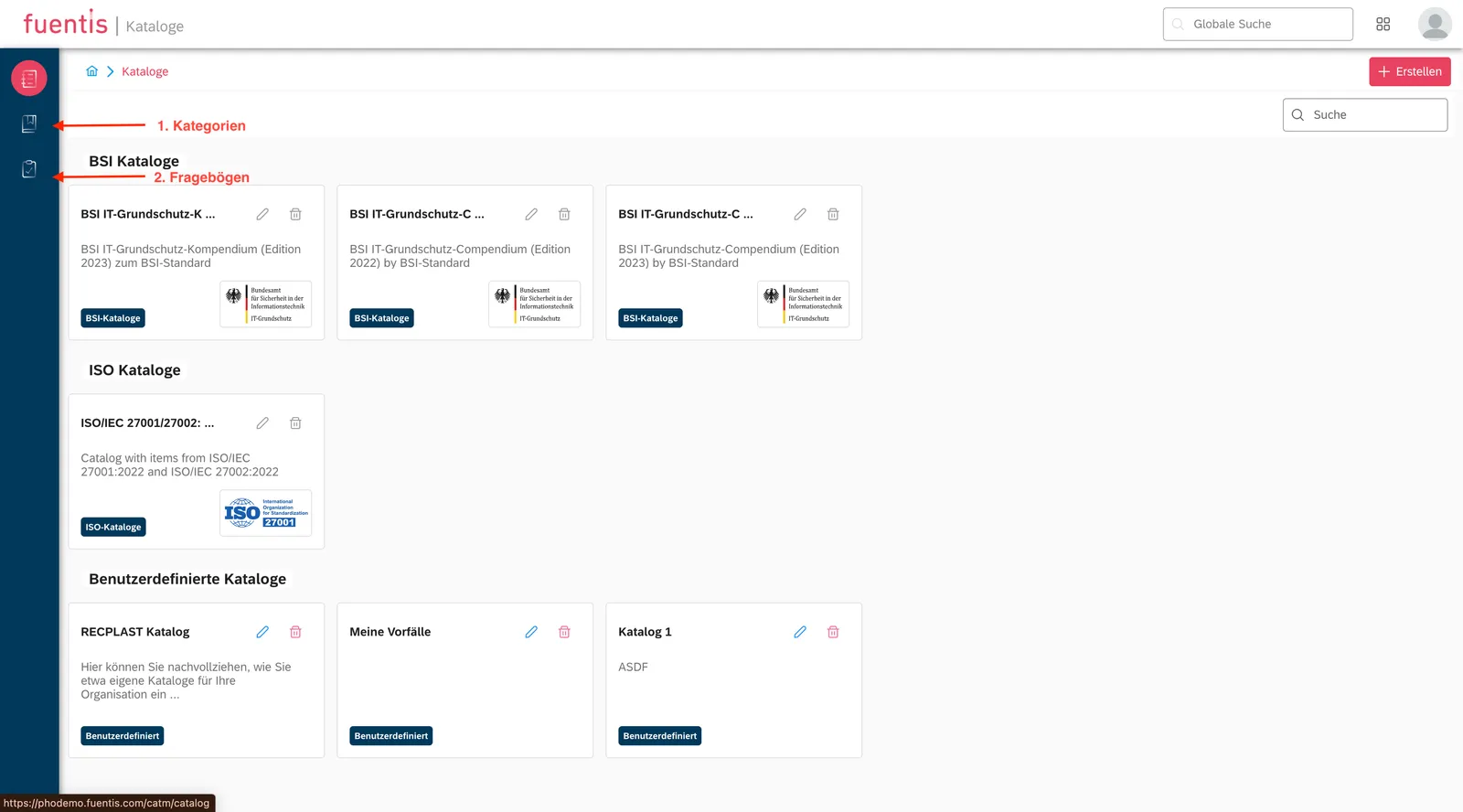
- Catalogs – Management, import, versioning, content
- Structure Categories – optional technical organization (rarely needed in practice)
- Protection Needs Questionnaires – Templates/creation for standardized protection needs assessments
Practical Tip: Use questionnaires to standardize protection needs. We are happy to provide templates/best practices (see help section “Protection Needs Assessment”).
Catalog Objects in Detail
Section titled “Catalog Objects in Detail”Catalogs consist of linkable object types. The module principle serves as a thematic framework (e.g., “Network Security”) for related content.
1) Modules
Section titled “1) Modules”Definition: Thematic grouping (e.g., “Access Control”, “Network Security”).
Important Fields:
- Implementation Order (prioritization)
- Responsibility (roles/departments)
- Category (technical assignment)
2) Requirements
Section titled “2) Requirements”Definition: Specific specifications that must be met.
Important Fields:
- Responsibility per Catalog (framework default)
- Additional Responsibilities (internal)
- Metadata (description, implementation notes, evidence)
3) Controls
Section titled “3) Controls”Definition: Action instructions for fulfilling requirements.
Important Fields:
- Lifecycle (Planning → Implementation → Operation → Optimization)
- Effectiveness (protective effect, evidence)
- Implementation Effort (time/resources)
4) Threats
Section titled “4) Threats”Definition: Potential threats to information security.
Typical Categories:
- Elementary Events (fire, water, electricity)
- Deliberate Actions (hacking, sabotage)
- Organizational Deficiencies (missing processes/roles)
- Technical Failure (hardware/software)
5) Vulnerabilities
Section titled “5) Vulnerabilities”Definition: Weaknesses that threats can exploit.
Assessment Criteria: Exploitability • Impact Potential • Detection Probability
6) Damage Scenarios
Section titled “6) Damage Scenarios”Definition: Describe potential impacts.
Categorization by: Confidentiality • Integrity • Availability • Compliance
7) Checks
Section titled “7) Checks”Definition: Audit/monitoring mechanisms for control implementation.
Components: Control Objective (Target) • Purpose (Why) • Guidelines (How)
Controls or requirements? The mix-up everyone makes
Section titled “Controls or requirements? The mix-up everyone makes”The two standards call the same thing by different names, and the Catalog Manager carries both vocabularies:
| Standard | What it calls a provision | Where it lives in the catalog |
|---|---|---|
| ISO 27001 Annex A | control | Controls |
| BSI IT-Grundschutz | requirement | Requirements |
Look for requirements in an ISO catalog and you find nothing, even though the catalog holds 93 provisions. They are under controls. The other way round, the IT-Grundschutz provisions sit under requirements. When in doubt, check which catalog type you are working in.
Practical Implementation
Section titled “Practical Implementation”Creating Catalogs
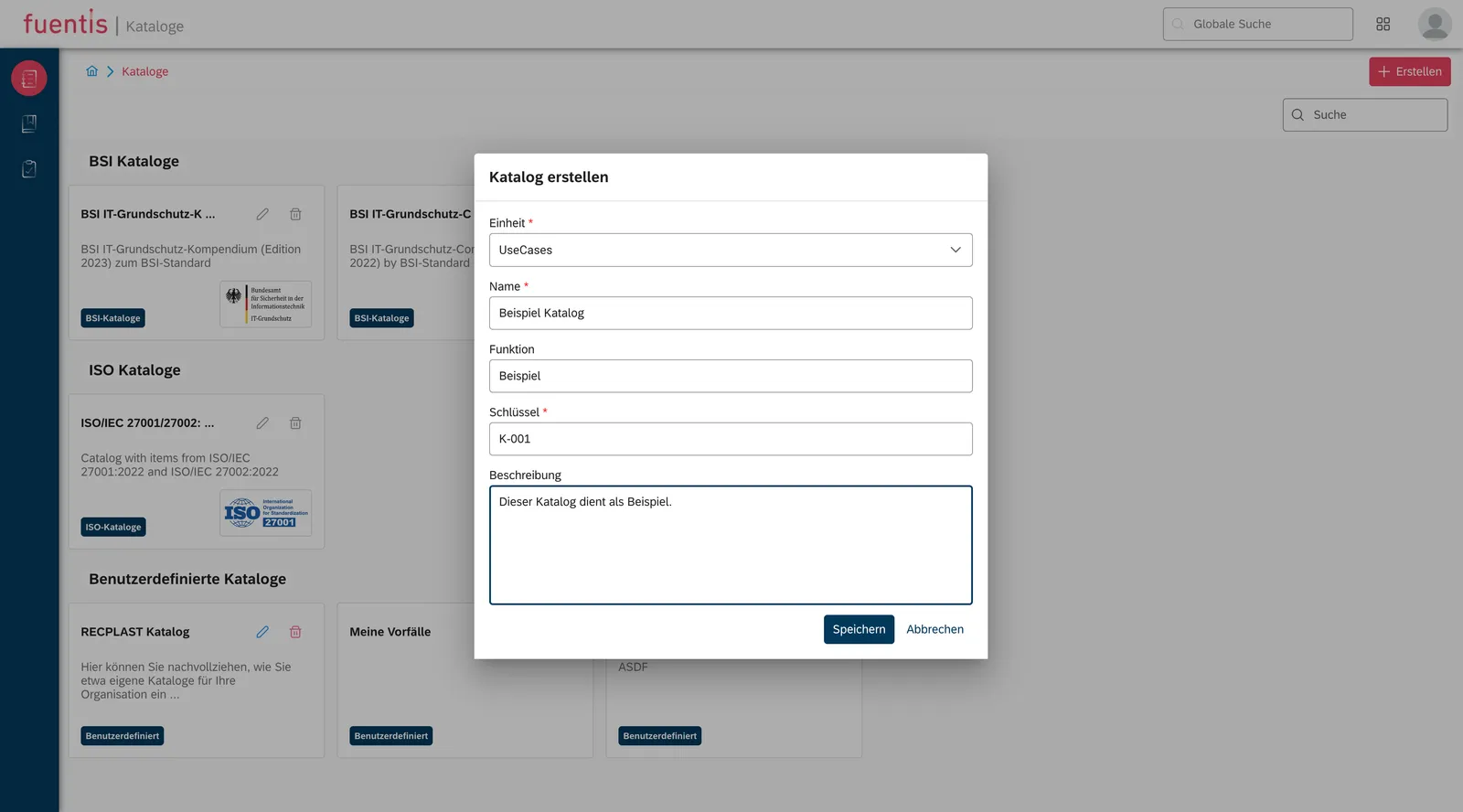
Section titled “Creating Catalogs”- Catalogs → Create
- Maintain basic data: Name, Description, Catalog Type, Scope of Validity
- Save
Managing Content
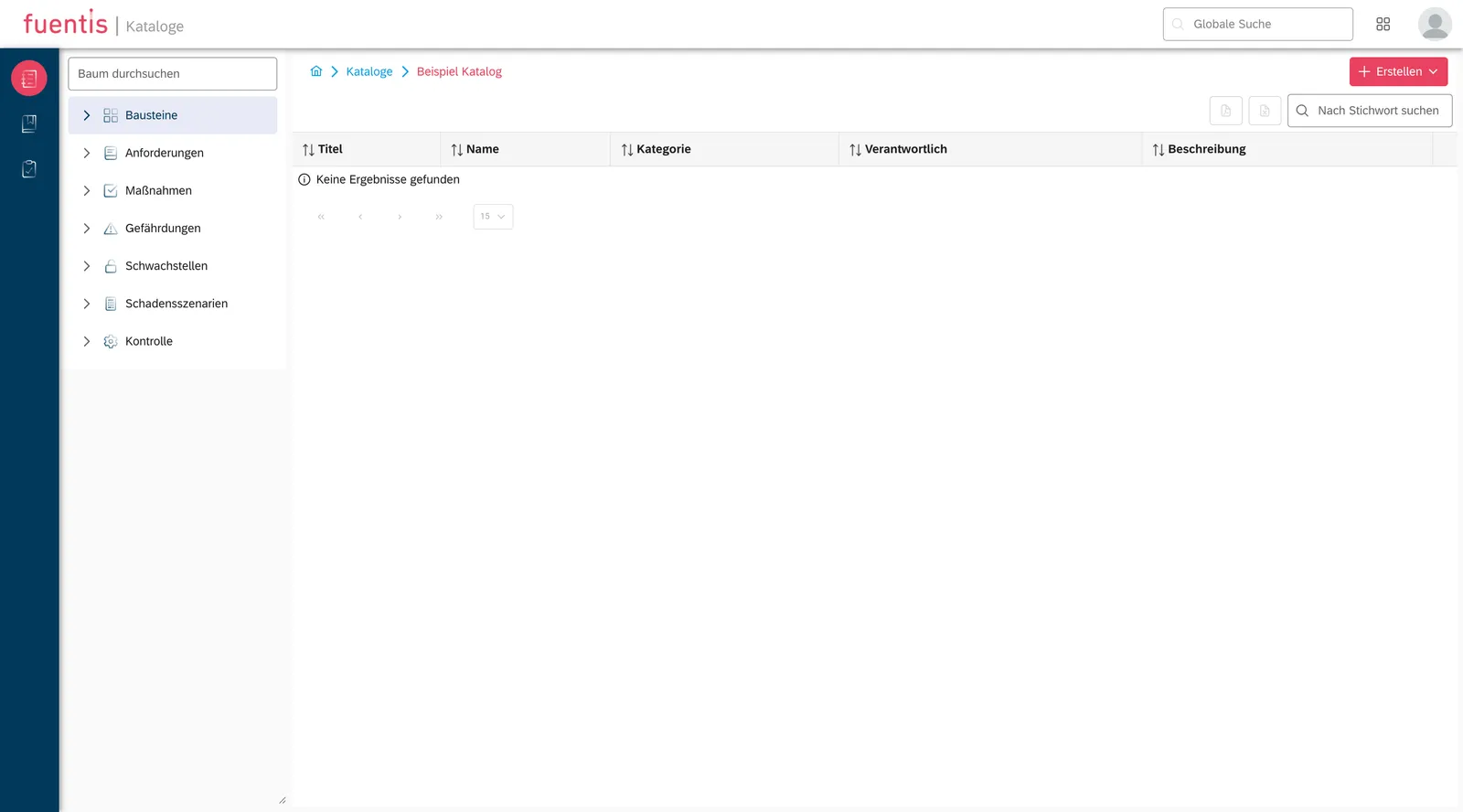
Section titled “Managing Content”- Open catalog → Create
- Select Object Type (Module/Requirement/Control/…)
- Fill in Fields & Metadata (incl. responsibilities/evidence)
Best Practice: First define modules, then assign requirements and controls.
Assigning Catalogs (e.g., in Risk Analysis)
Section titled “Assigning Catalogs (e.g., in Risk Analysis)”- Open module → Catalogs tab
- Select Assign
- Select relevant catalogs → Content is available context-specific
Reference instead of assigning twice
Section titled “Reference instead of assigning twice”Maintaining the same requirement separately on ten target object groups is the most common reason an ISMS becomes unwieldy in the tool. Where an assignment repeats, reference the existing object rather than assigning it again. You then maintain it in one place and the model stays readable.
This works across catalogs too. You can run ISO 27001 as your leading catalog and reference threats or measures from IT-Grundschutz without modeling both catalogs in full. How references are created is described under Modeling.
Protection Needs Questionnaires
Section titled “Protection Needs Questionnaires”The Catalog Manager contains an integrated questionnaire function for standardized protection needs assessments.
Creating Questionnaires
Section titled “Creating Questionnaires”- Questionnaires → Create
- Type (Protection Needs Assessment), Unit, Name, Description
Modeling Questions & Answers
Section titled “Modeling Questions & Answers”Questions (Core Elements):
- Number (ID)
- Protection Goal (Confidentiality/Integrity/Availability)
- Question (clear & measurable)
- Description (explanation/examples)
Answers (Assignment):
- Category (normal/high/very high)
- Answer Text (option)
- Description (consequences/justification)
Best Practice: Per protection goal, at least as many answer options as protection needs categories exist.
Example Items (Excerpt)
Section titled “Example Items (Excerpt)”| # | Protection Goal | Question | Assessment/Guideline |
|---|---|---|---|
| 1 | Confidentiality | What would be the consequences of unauthorized access to the processed information? | Normal: minor impacts • High: significant legal/financial consequences • Very High: existential threat |
| 2 | Availability | How long can the system/information be unavailable at most? | Normal: several days tolerable • High: up to 24 h • Very High: only a few hours |
| 3 | Integrity | What would be the consequences of undetected data changes? | Normal: limited disruptions • High: significant process errors • Very High: security/compliance incident |
Answer Options (Example “Availability”):
- Only a few hours tolerable → business-critical → very high
- Maximum 24 hours tolerable → significant impairments → high
- Several days tolerable → non-critical → normal
Activating Questionnaires
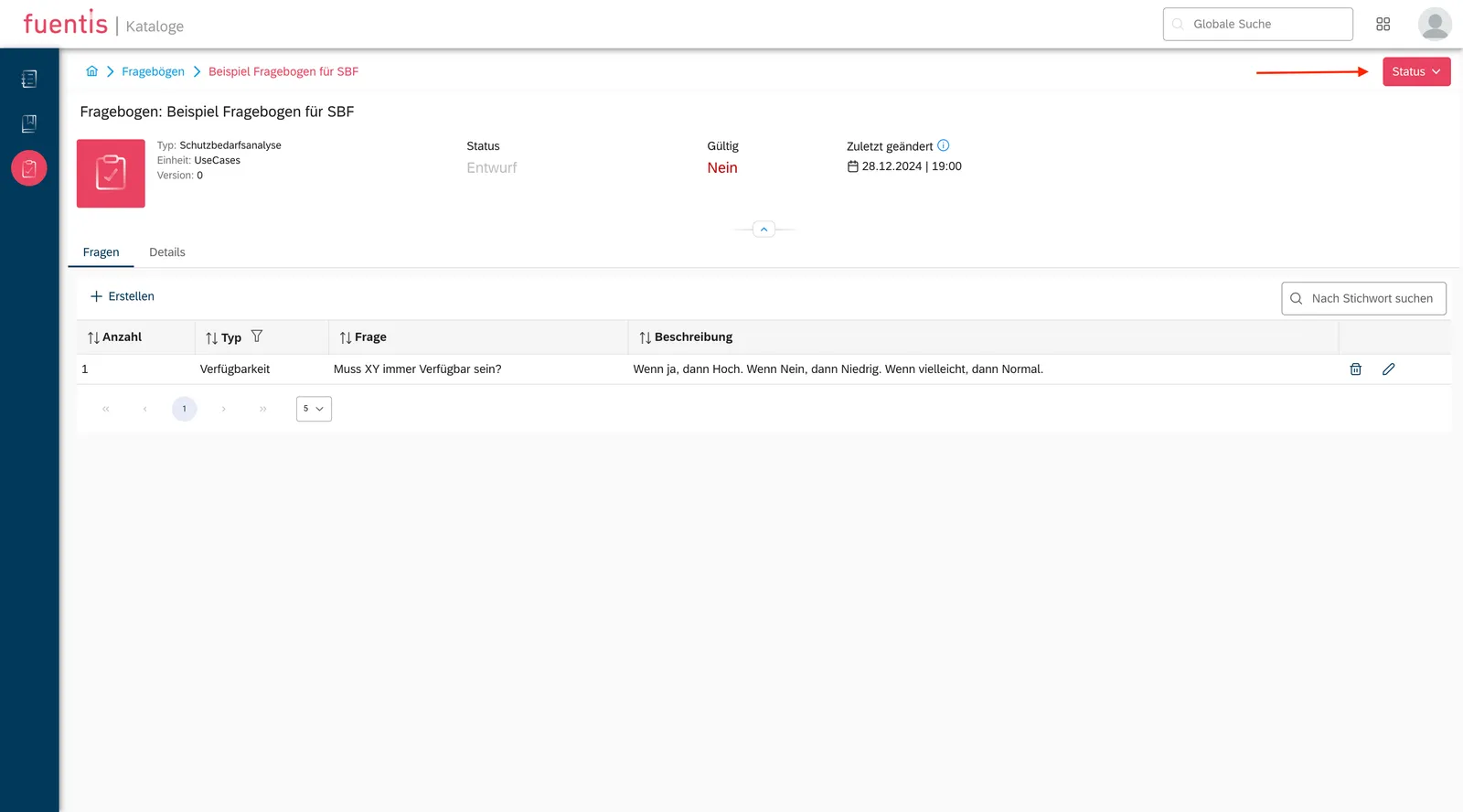
Section titled “Activating Questionnaires”- Open questionnaire → Status
- Set Active
Structuring & Governance
Section titled “Structuring & Governance”Recommendations:
- Hierarchical Catalog Structure (topics → subtopics)
- Clear Naming Conventions (prefixes, IDs, versions)
- Versioning & Change Log (traceability)
- Roles/Owner per Object (responsibility & maintenance)
Typical Use Cases
Section titled “Typical Use Cases”1) Introducing New Technology
Section titled “1) Introducing New Technology”- Review relevant standard catalogs
- Add specific threats/vulnerabilities
- Define controls, plan checks
- Integrate into risk analysis/ISMS processes
2) Audit Preparation
Section titled “2) Audit Preparation”- Assign standard catalog(s)
- Compare actual controls
- Identify & prioritize gaps
- Bundle evidence/controls