

Gap-Analysis (SoA)
Gap analysis and the Statement of Applicability show where your organization stands against ISO 27001 or BSI IT-Grundschutz, and what is still missing before certification.
This page starts with how to operate the module in the fuentis Suite. The methodical background on gap analysis, SoA and IT-Grundschutz follows below under Methodical background.
Creating a gap analysis
Section titled “Creating a gap analysis”Navigation: ISMS → Gap Analysis
The key point first: the overview starts out empty. You will see neither catalogs nor results as long as no gap analysis exists and no catalog is selected. Looking for content here is futile: an analysis has to be created first.
There are two ways to do that.
Way 1: While creating a scope
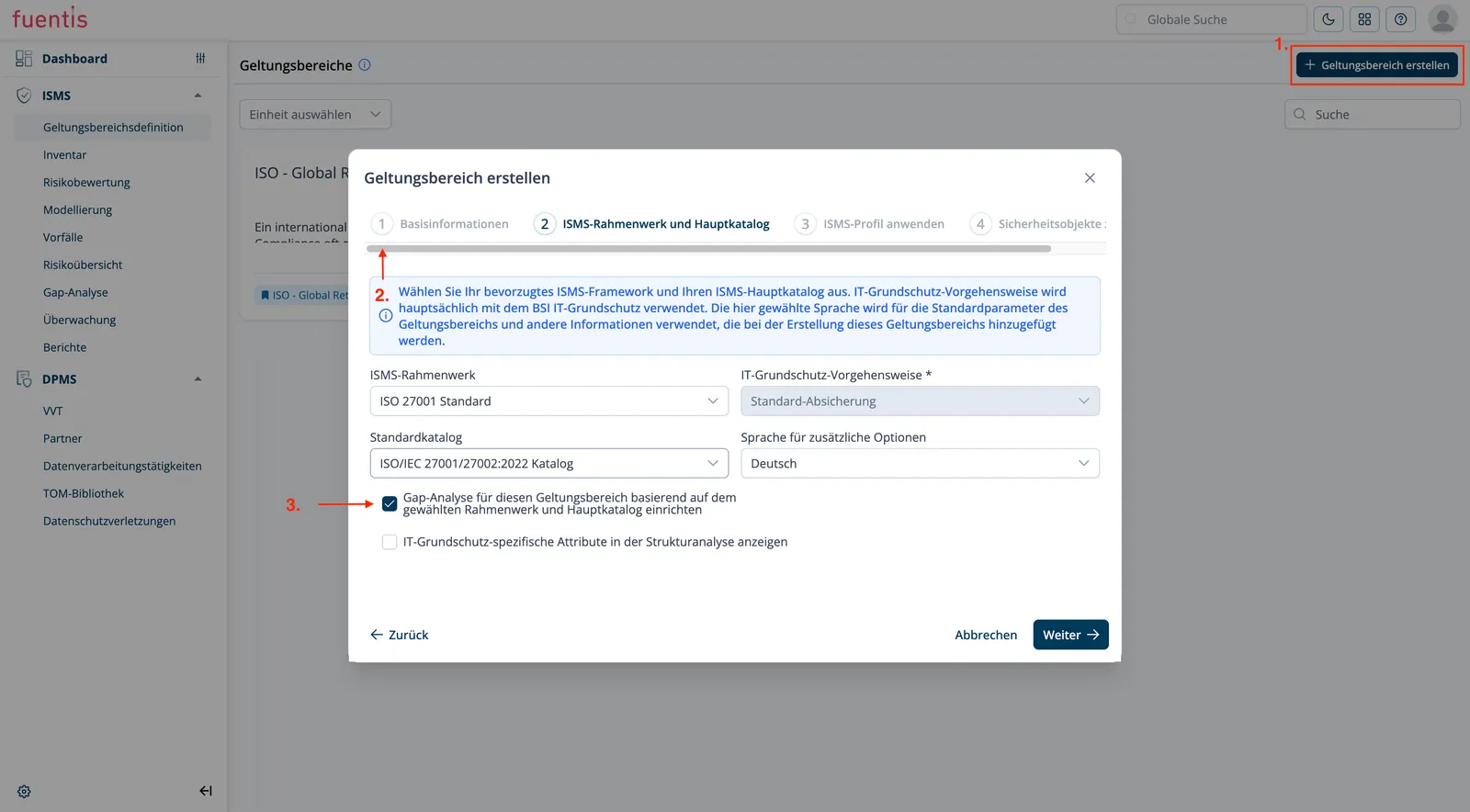
Section titled “Way 1: While creating a scope”The recommended route. When creating a scope, tick the box Set up gap analysis for this scope based on the selected framework and main catalog in step 2 (ISMS framework and main catalog).
This creates the gap analysis automatically with the matching catalog, here
ISO/IEC 27001/27002:2022.
Navigation: ISMS → Scope Definition → + Create scope
Way 2: Directly in the Gap Analysis module
Section titled “Way 2: Directly in the Gap Analysis module”Via the + Create gap analysis button at the top right. Use this route when the scope already exists. The form asks for:
- Type of gap analysis (field at the top right): ISO or BSI. This choice drives which catalogs are offered below it.
- Catalog: the analysis’s main catalog. You can assign further ones. Only assigned catalogs feed controls into the analysis.
- Name and description.
Then Save.
German or English catalog?
Section titled “German or English catalog?”Every standard catalog ships twice, once in German and once in English. You can spot the English one by the word Catalog in its name. The content is the same either way.
What differs is the language the controls come out in. Titles and descriptions follow the catalog, in the analysis and later in the report. The interface language does not help here, because it follows your user account: a German interface can happily show you English control names. So check the catalog before you save.
Selecting a catalog
Section titled “Selecting a catalog”Even with an analysis in place the overview stays empty at first. The Please select catalog dropdown at the top left is where you pick the catalog. Only then do the gap analyses appear as cards.
Each card shows name, description, the underlying catalog, progress in percent and the associated scope.
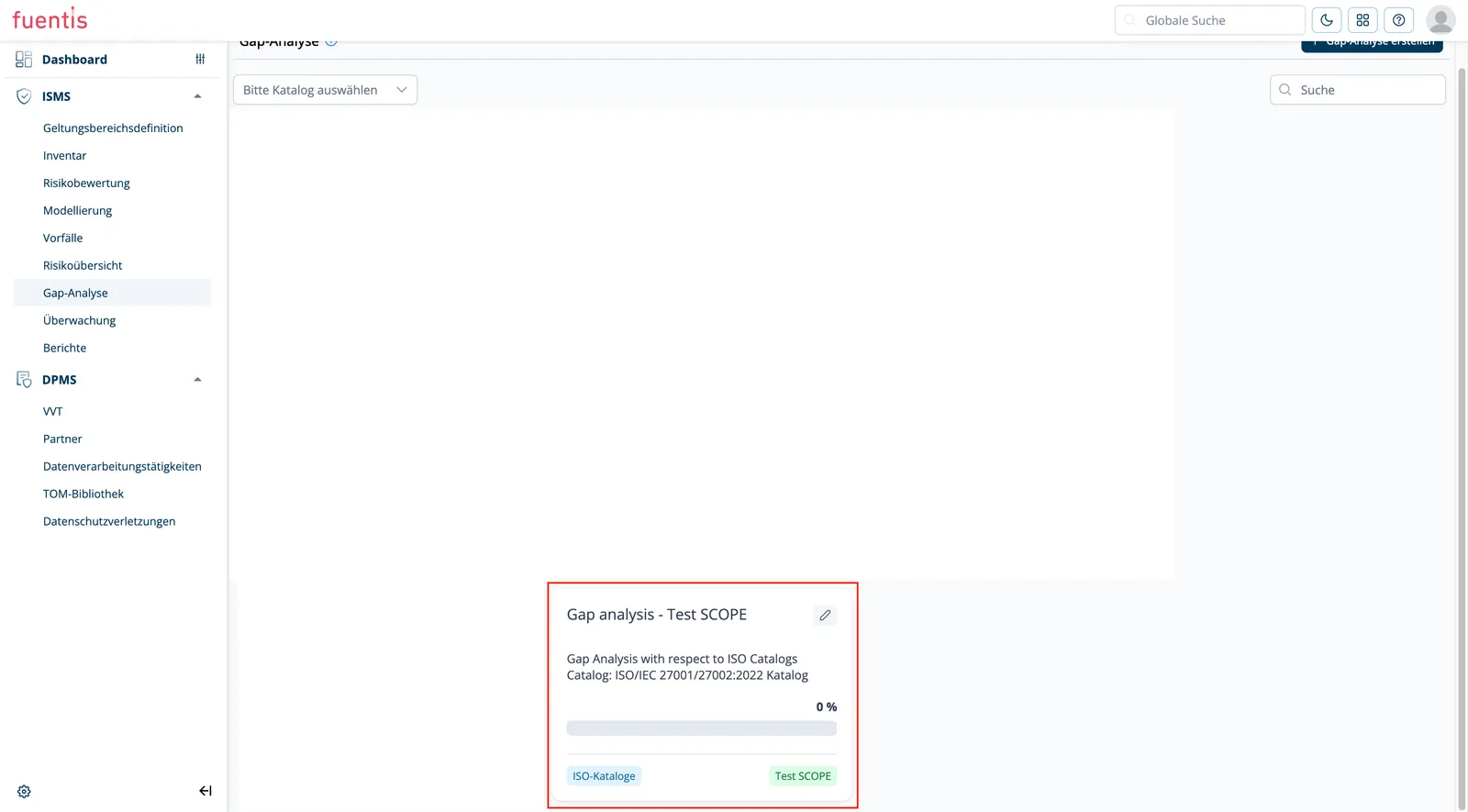
Practice tip: If progress reads 0 %, the analysis exists but no control has been assessed yet. That is the normal starting state.
Step by step through the gap analysis
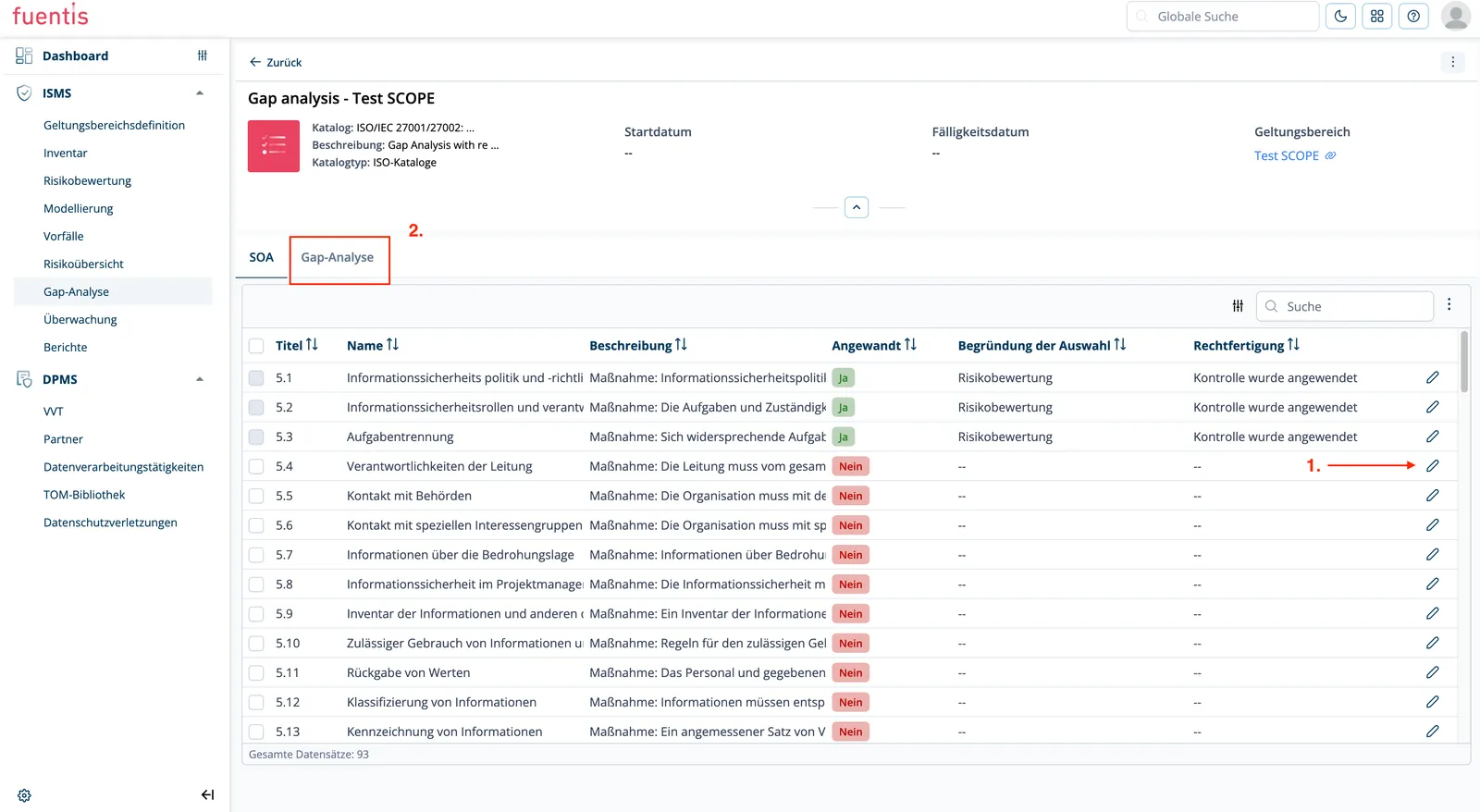
Section titled “Step by step through the gap analysis”Clicking a card opens the analysis. It has two tabs: SOA and Gap Analysis. Both work on the same catalog but show different views.
Step 1: Decide applicability per control (SOA tab)
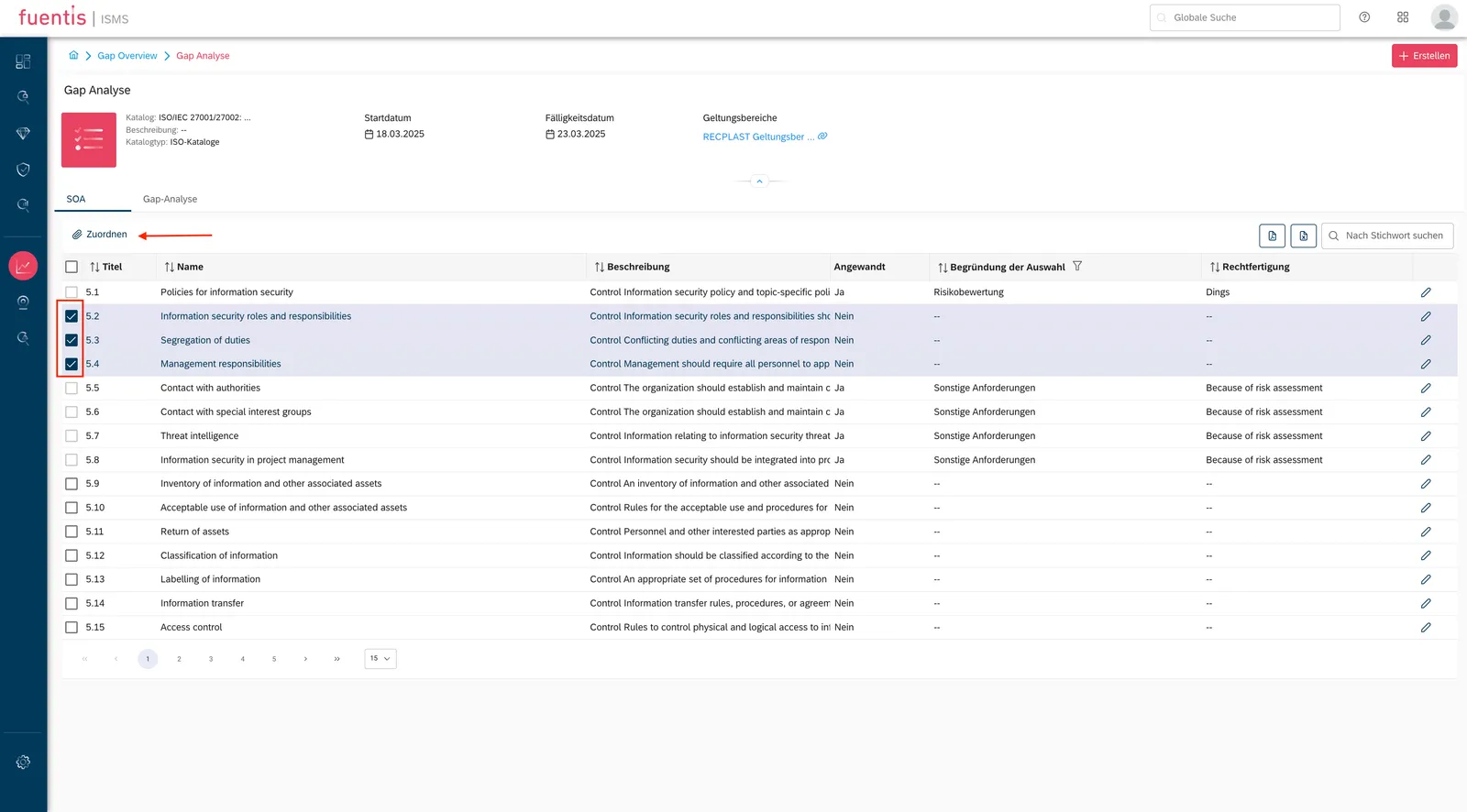
Section titled “Step 1: Decide applicability per control (SOA tab)”The SOA tab lists every control in the catalog — for ISO 27001 all 93 from Annex A. Per row you decide via the pencil icon on the right:
- Applied: Yes or No
- Reason for selection: e.g. Risk assessment
- Justification: free text on why the decision was made
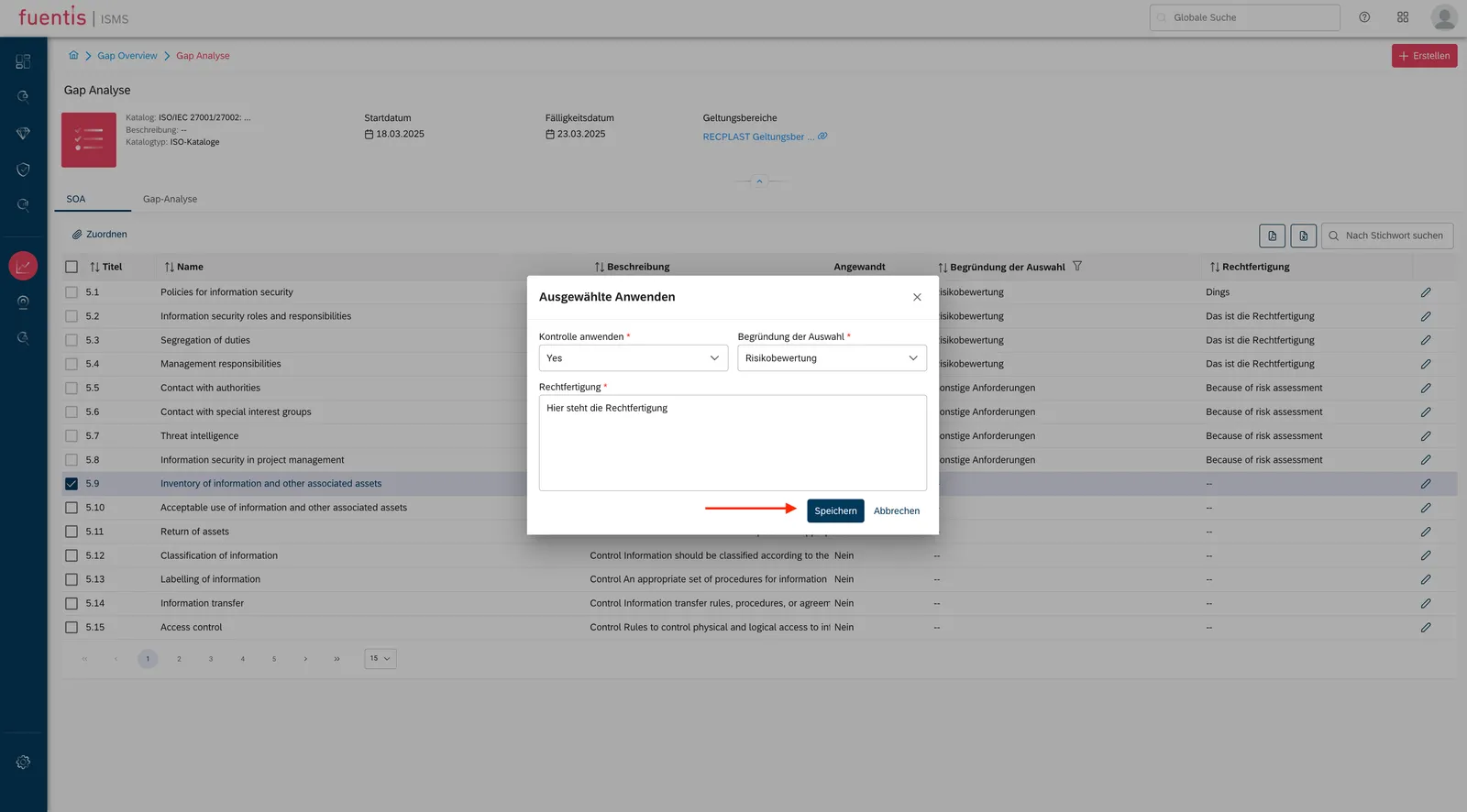
You can also tick several rows on the left and assess them together via Assign on the right. Saved rows turn green.
Reason for selection is a dropdown, not free text. It includes, among others:
| Reason | When it fits |
|---|---|
| Legal requirement | The normal case for ISO 27001. Anyone aiming for certification has to consider Annex A. |
| Contractual requirement | The control comes out of a customer or supplier contract. |
| Business requirement | An internal rule, typical for your own catalogs. |
| Risk assessment | The control answers a specific assessed risk. |
The justification below it is free text. For controls you apply, a short standard sentence such as “ISO 27001 compliance” is enough. The field earns its keep on the exclusions: why a control does not apply is the question an auditor asks. An exclusion without a defensible reason stands out.
The controls marked Yes are your statement of applicability. Those marked No are the candidates for the gap review.
Step 2: Work the gaps in the Gap Analysis tab
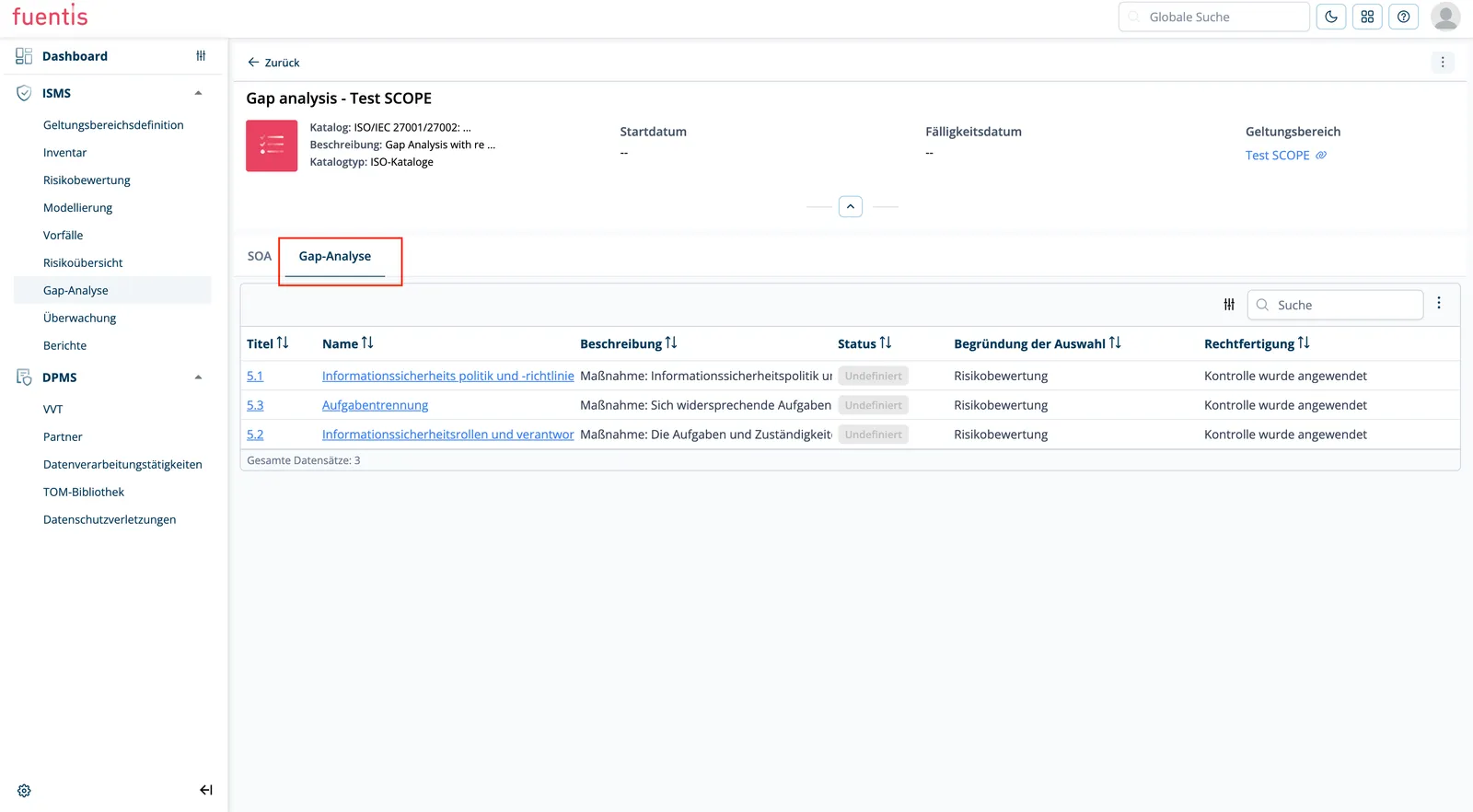
Section titled “Step 2: Work the gaps in the Gap Analysis tab”The Gap Analysis tab shows the controls that need action. The columns match the SOA tab, plus Status.
As long as a gap has not been assessed, the status reads Undefined. That is exactly the backlog: every row marked Undefined is waiting for a decision.
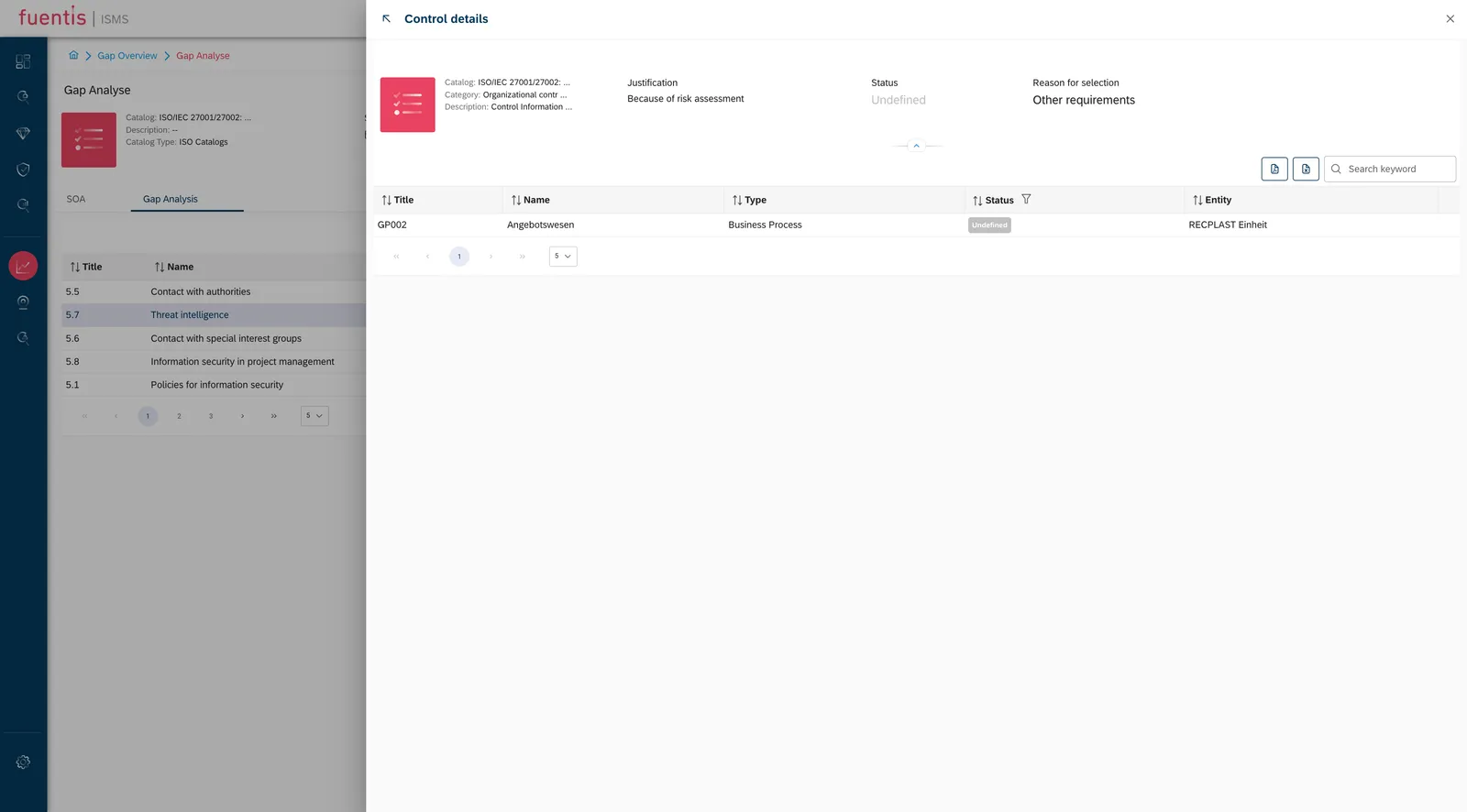
Step 3: Check where the control has to be implemented
Section titled “Step 3: Check where the control has to be implemented”Clicking a control’s name opens its detail view, which lists the target object groups it is already assigned to. That list is the real work plan: it shows how many places the control has to be implemented in before its status can move to Implemented.
An empty list means the control has been declared applicable but modeled nowhere. There is nothing to implement yet. The assignment is made in Modeling or out of a risk assessment.
The gap grows with the number of assignments. A control assigned to ten target object groups has to be implemented ten times and evidenced ten times. Some requirements you cover once, centrally, with a policy. Others you have to demonstrate process by process. How finely you cut your target object groups is decided during structural analysis. You live with the consequences here.
Step 4: Maintain the status
Section titled “Step 4: Maintain the status”Via the pencil icon you set the implementation status per control:
- Fully implemented
- Partially implemented (with schedule)
- Planned (with milestone plan)
- Not applicable (with justification)
The route through Modeling does the same thing: open the target object group, open the control there, Edit, set the status to Implemented, Save. Both routes write to the same object.
The progress bar on the overview card follows as controls get assessed.
Step 5: Export and report
Section titled “Step 5: Export and report”The two document icons above the table on the right export the analysis for management reviews and audits.
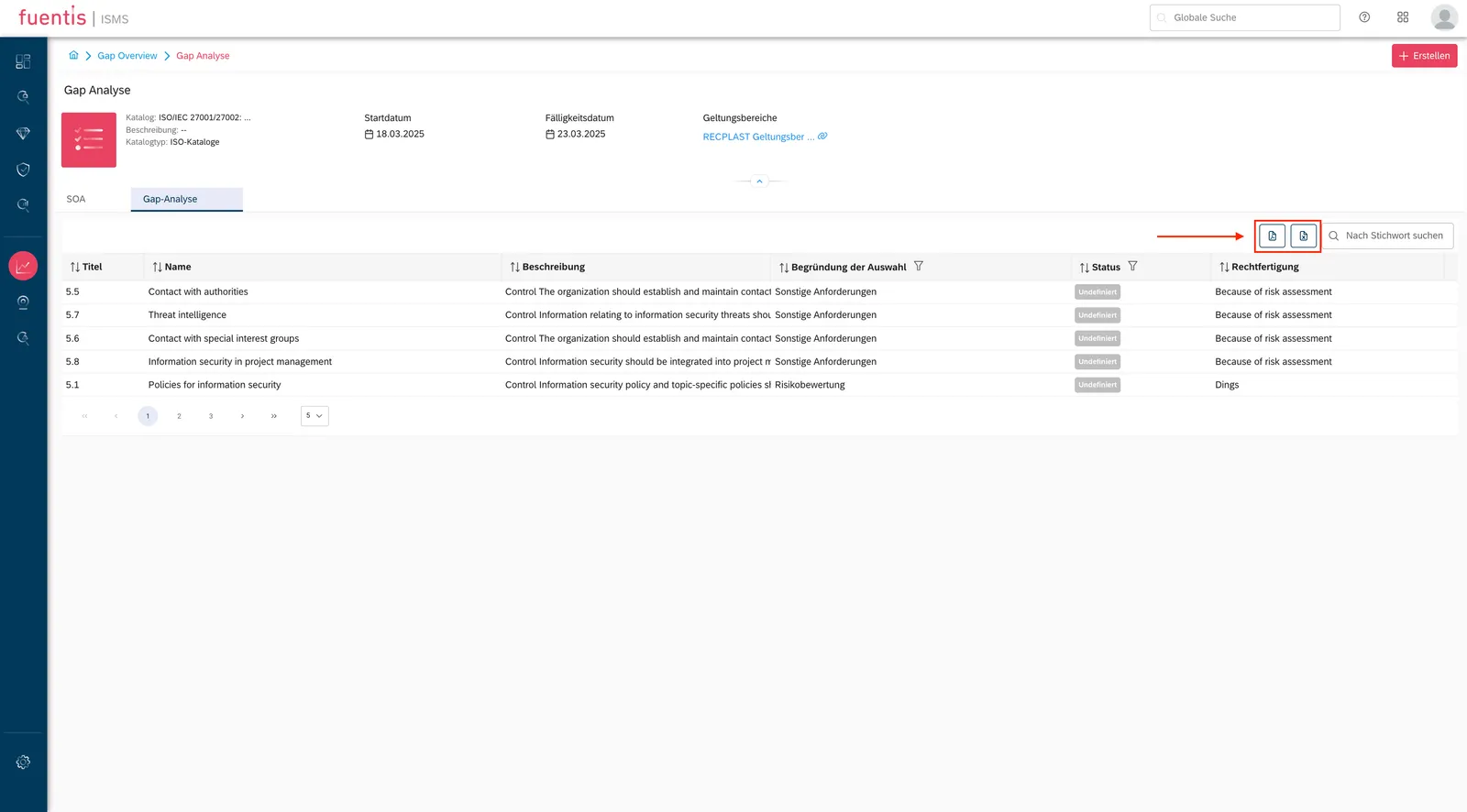
Create report turns the analysis into a PDF that carries the evaluation out of the tool. The report only says something once applicability and assignments are in place. Before that it is mostly empty rows.
Practice tip: Use the export functions for regular management reviews. The visual presentation makes communicating ISMS progress easier.
How progress is calculated
Section titled “How progress is calculated”The percentage on the overview card counts the controls you have applied within the scope, not all 93 from ISO 27001 Annex A.
An example: exactly one control is applied, 5.18 Access rights, and its status
is Implemented. The gap analysis reads 100 %. Apply two more controls and the
same state drops to 33 %, without anything having got worse.
Hence the order of work:
- Settle applicability first. Go through every control in the catalog and decide which ones apply.
- Then track implementation.
Do it the other way round and you are reporting a number that collapses every time another control is applied.
Note: In the fuentis flex version, gap analyses can be created directly in scoping.
Methodical background
Section titled “Methodical background”Definition and Purpose
Section titled “Definition and Purpose”A gap analysis in the ISMS context is a structured method for identifying the difference between an organization’s current security level and the requirements of a specific standard (ISO 27001, BSI IT-Grundschutz, or industry-specific requirements).
Core Objectives of Gap Analysis
Section titled “Core Objectives of Gap Analysis”1. Capture Current State
- Documentation of existing security measures
- Assessment of the effectiveness of implemented controls
- Identification of informal security practices
Note: This is accomplished in the Security Check/Modeling module.
2. Define Target Requirements
- Systematic comparison with standard specifications
- Consideration of legal and contractual requirements
- Integration of industry-specific best practices
3. Identify Gaps
- Categorization by criticality
- Risk assessment of missing measures
- Prioritization by implementation effort
Note: This is handled in the Risk Analysis module.
4. Develop Action Plan
- Concrete action recommendations
- Resource planning and budgeting
- Timeline toward certification readiness
Note: This is visible in the Risk Monitoring module (Risk Treatment Plan)
Implementation Methodology
Section titled “Implementation Methodology”The gap analysis follows a structured process:
Phase 1: Preparation
- Define scope and system boundaries
- Assemble project team
- Collect relevant documentation
Phase 2: Data Collection
- Interviews with process owners
- Review existing policies and procedures
- Technical review of IT infrastructure
Phase 3: Assessment
- Comparison with standard catalog
- Maturity assessment of controls
- Documentation of deviations
Phase 4: Reporting the Results
- Creation of gap analysis report
- Visualization of results
- Derivation of action catalog
Practice Tip: Conduct the gap analysis iteratively. An initial rough analysis quickly provides an overview, while subsequent detailed analyses deepen specific areas.
Statement of Applicability (SoA)
Section titled “Statement of Applicability (SoA)”Concept and Significance
Section titled “Concept and Significance”The Statement of Applicability is a central document in the ISO 27001 ISMS that lists all 93 controls from Annex A of the standard and documents for each individual measure:
- Applicability: Is the control relevant for the organization?
- Justification: Why was this decision made?
- Implementation Status: What is the current implementation level?
- References: Reference to supporting documents and evidence
Functions of the SoA
Section titled “Functions of the SoA”1. Evidence of Risk Treatment The SoA documents how identified risks are addressed through specific controls. It creates the connection between risk analysis and measure implementation.
2. Certification Basis Auditors use the SoA as an audit basis. It defines the scope of certification and serves as a checklist during the audit.
3. Communication Tool The SoA makes security decisions transparent and comprehensible for management, auditors, and stakeholders.
4. Compliance Evidence It demonstrates the systematic engagement with all relevant security aspects and justifies conscious decisions.
Creation and Maintenance of the SoA
Section titled “Creation and Maintenance of the SoA”Step 1: Control Assessment Each of the 93 controls from ISO 27001 Annex A is individually assessed:
- Check relevance for the business model
- Establish risk relationship
- Conduct cost-benefit analysis
Step 2: Document Justification
- When applied: How is the control implemented?
- When not applied: Why is it not relevant?
- Describe compensatory measures
Step 3: Define Status
- Fully implemented
- Partially implemented (with schedule)
- Planned (with milestone plan)
- Not applicable (with justification)
Step 4: Continuous Updates
- Regular reviews (at least annually)
- Adjustments when scope changes
- Integration of new risks and threats
Practice Tip: Use version control for your SoA. Document changes transparently to make the development of your ISMS clear.
SoA management in the fuentis Suite
Section titled “SoA management in the fuentis Suite”Central Administration
- All controls in a clear matrix
- Filter and search functions
- Versioning and change history
Collaboration
- Assignment of responsibilities
- Comment function for coordination
- Workflow for approval processes
Export and Reporting
- PDF export for management presentations
- Audit-compliant documentation
Integration of BSI IT-Grundschutz
Section titled “Integration of BSI IT-Grundschutz”Specifics of IT-Grundschutz
Section titled “Specifics of IT-Grundschutz”While ISO 27001 follows a risk-based approach, BSI IT-Grundschutz works with building blocks and predefined protection requirements:
Basic Protection
- Standardized measures for normal protection requirements
- Quick implementation through building block catalog
- Suitable for typical IT infrastructures
Standard Protection
- Extended measures for higher protection requirements
- Additional organizational controls
- More detailed documentation requirements
Combined Approach
Section titled “Combined Approach”Many organizations use a hybrid approach:
- IT-Grundschutz for IT infrastructure
- ISO 27001 for organization-wide processes
- Industry standards for specific requirements
Best Practices for Successful Gap Analyses
Section titled “Best Practices for Successful Gap Analyses”1. Secure Top Management Support
Section titled “1. Secure Top Management Support”- Early involvement of senior management
- Clear communication of benefits
- Document resource commitments
2. Realistic Planning
Section titled “2. Realistic Planning”- Plan buffer times for unexpected findings
- Prefer iterative approach
- Identify and implement quick wins
3. Include Stakeholders
Section titled “3. Include Stakeholders”- Involve functional departments early
- Reduce resistance through transparency
- Communicate successes
4. Documentation from the Start
Section titled “4. Documentation from the Start”- Record decisions transparently
- Systematically collect evidence
- Build audit trail
5. Continuous Improvement
Section titled “5. Continuous Improvement”- Establish gap analysis as recurring process
- Document lessons learned
- Define KPIs for progress measurement
Common Challenges and Solution Approaches
Section titled “Common Challenges and Solution Approaches”Challenge 1: Incomplete Inventory
Section titled “Challenge 1: Incomplete Inventory”Problem: Informal security measures are overlooked Solution: Structured interviews with operational teams, shadow IT analysis
Challenge 2: Overambitious Goals
Section titled “Challenge 2: Overambitious Goals”Problem: Attempt to close all gaps simultaneously Solution: Risk-based prioritization, develop phase model
Challenge 3: Lack of Acceptance
Section titled “Challenge 3: Lack of Acceptance”Problem: Controls are perceived as bureaucracy Solution: Communicate benefits, streamline processes, automation
Challenge 4: Resource Shortage
Section titled “Challenge 4: Resource Shortage”Problem: Budget and personnel for implementation are missing Solution: Create business case, external support, cloud solutions
Connection to Other ISMS Components
Section titled “Connection to Other ISMS Components”Risk Analysis
Section titled “Risk Analysis”- Gap analysis identifies risks through missing controls
- SoA documents risk treatment
- Interaction in prioritization
Process Landscape
Section titled “Process Landscape”- Controls are integrated into processes
- Process owners defined for controls
- KPIs derived from gap analysis
Internal Audit
Section titled “Internal Audit”- SoA as audit basis
- Gap analysis results as audit focus areas
- Continuous monitoring of implementation
Management Review
Section titled “Management Review”- Gap analysis status as agenda item
- SoA changes for approval
- Resource decisions based on gaps
Further Steps After Gap Analysis
Section titled “Further Steps After Gap Analysis”-
Specify Action Plan
- Define detailed work packages
- Assign responsibilities
- Set milestones
-
Develop Policies
- Create security policy
- Derive specific policies
- Formulate work instructions
-
Technical Implementation
- Implement security tools
- Harden infrastructure
- Set up monitoring
-
Create Awareness
- Develop training program
- Establish security champions
- Foster security culture
-
Certification Preparation
- Conduct pre-audit
- Complete documentation
- Select certification body