Inventoryanalysis
Note: In the new Trust interface, these phases are on a content level. There is no longer a separation between the phases “Structural Analysis (Inventory)” and “(Protection Requirements Analysis)”. Functions have not been removed. Content has only been merged and redundancies consolidated.
Overview
Section titled “Overview”Scope Definition (Scoping) – Overview
Section titled “Scope Definition (Scoping) – Overview”Scope definition (Scoping) is a central module of the ISMS management system. It enables the definition and management of security scopes for organizations in the context of Information Security Management Systems (ISMS) and Data Protection Management Systems (DPMS).
Purpose:
- Defining the boundaries and scope of security concepts
- Documenting security responsibilities and roles
- Managing different scopes per organizational unit
- Classifying protection requirements according to defined categories
Structural Analysis – Overview
Section titled “Structural Analysis – Overview”Structural analysis is the first step in building an Information Security Management System (ISMS) according to ISO 27001 or IT-Grundschutz. In this phase, the boundaries of the ISMS are defined, all relevant IT assets are inventoried, and their dependencies are documented. The fuentis Suite supports you with a structured, modular approach.
Why is structural analysis important?
- Creates clear responsibilities for information security
- Focuses resources on critical areas
- Forms the basis for systematic risk management
- Facilitates ISO 27001 certification
Protection Requirements Assessment (PRA) – Overview
Section titled “Protection Requirements Assessment (PRA) – Overview”The Protection Requirements Assessment (PRA) is a central component of the IT security concept according to IT-Grundschutz and ISO/IEC 27001. It answers the fundamental question: How much protection do our information, applications, and IT systems need?
Through systematic analysis, it is determined which assets are critical for the company and which security measures are appropriate. This creates the foundation for an efficient and effective Information Security Management System (ISMS).
Scope Definition (Scoping)
Section titled “Scope Definition (Scoping)”1. Overview
Section titled “1. Overview”(Identical to overview above)
2. Main Functions
Section titled “2. Main Functions”2.1 Scopes Overview
Section titled “2.1 Scopes Overview”The overview page shows all defined scopes in a card view:
Card Elements: Each scope is displayed as a card with:
- Scope title
- Security concept description
- Associated organizational unit
- Certification standard (e.g., ISO-27001)
Filtering: Scopes can be filtered by organizational unit
Search Function: Quick search for scopes via search bar

2.2 Create Scope
Section titled “2.2 Create Scope”New scopes are created via the ”+ Create Scope” button.
The creation process runs in 4 steps:
Step 1: Basic Information
- Select unit: Choose the organizational unit
- Name: Unique name for the scope
- Title: Technical identifier (e.g., SCP-0001)
- Function: Define the role of the scope (Superordinate, Subordinate)
- Status: Define the current status (e.g., Draft, Active)
- Description: Detailed documentation of the security concept

Step 2: ISMS Framework and Main Catalog
- Selection of applicable security standard
- Definition of security catalog for the scope

Step 3: Apply ISMS Profile
- Application of predefined security profiles
- Automatic assignment of security requirements

Step 4: Assign Security Objects
- Assignment of systems, processes, and assets
- Definition of objects to be protected within the scope

3. Detailed View of a Scope
Section titled “3. Detailed View of a Scope”After selecting a scope, the detailed view opens with the following information:
3.1 Tab: Details
Section titled “3.1 Tab: Details”Basic Information:
- Name and title
- Associated organizational unit
- Type (e.g., Scope)
- Creation date and user
- Validity status (Standard/Current)
Base Data:
- Complete input fields for editing
- Responsibility information
- Options for using protection requirements questionnaires
Review Management:
- Structural analysis review status
- Due dates for reviews
- Responsible person for approval
Release Management:
- Release status of structural analysis
- Due date for releases
- Responsible person and release date

3.2 Tab: Protection Requirement Categories
Section titled “3.2 Tab: Protection Requirement Categories”This tab shows the protection requirement classifications defined for the scope:
Categories by Protection Requirements:
- Category - Normal: Standard security requirements
- Category - High: Increased security requirements with the following aspects:
- Violation of laws/regulations/contracts
- Impairment of informational self-determination
- Impairment of personal integrity
- Impairment of task fulfillment
- Negative internal or external impact
- Financial impacts
- Category - Very High: Critical security requirements (with the same aspects as “High”)
Function: This categorization enables risk-based assignment of security measures.

4. Important Concepts
Section titled “4. Important Concepts”4.1 Scope Hierarchy
Section titled “4.1 Scope Hierarchy”- Superordinate Scopes: Define general, company-wide security policies
- Subordinate Scopes: Specific security concepts for individual business areas or services
4.2 Security Concepts
Section titled “4.2 Security Concepts”A scope is defined by a security concept that:
- Establishes the boundaries of responsibility and authority
- Documents security requirements and measures
- Correlates with a recognized standard (e.g., ISO 27001)
4.3 Organizational Unit
Section titled “4.3 Organizational Unit”- Defines the affiliation of the scope
- Can have superordinate and subordinate relationships
- Enable organization-specific security policies

5. Best Practices
Section titled “5. Best Practices”- Clear demarcation: Ensure that scopes are clearly distinguishable from each other
- Documentation: Use meaningful descriptions for each scope
- Regular review: Update scopes regularly according to organizational changes
- Hierarchical structure: Use the hierarchy to manage complex security landscapes
- Protection requirement classification: Use protection requirement categories to prioritize security measures
6. Navigation and Operation
Section titled “6. Navigation and Operation”| Element | Function |
|---|---|
| Global Search | Quick search for scopes or other elements |
| Select Unit | Filtering by organizational unit |
| Search Bar | Real-time filtering of displayed scopes |
| Edit Button | Opens edit mode for details |
| Back Button | Return to overview page |
| Tabs | Navigation between different information areas |
7. Typical Workflows
Section titled “7. Typical Workflows”Workflow 1: Create New Scope
- Click “Create Scope” button
- Enter basic information
- Navigate through “Framework”, “Profile” and “Objects” steps
- Save and complete

Workflow 2: Edit Existing Scope
- Select scope from overview
- Click “Edit” button
- Change desired fields
- Save changes

Workflow 3: Review Protection Requirement Categories
- Open scope
- Navigate to “Protection Requirement Categories” tab
- View categories and adjust if necessary

Protection Requirements Assessment (PRA)
Section titled “Protection Requirements Assessment (PRA)”Why is the Protection Requirements Assessment relevant?
Section titled “Why is the Protection Requirements Assessment relevant?”- Resource optimization: Security measures are deployed specifically where they are most needed
- Transparency: Traceable justification for security investments
- Compliance: Meeting regulatory requirements (BSI IT-Grundschutz, ISO 27001)
- Risk minimization: Systematic identification and assessment of protection requirements
- Prioritization: Clear decision basis for implementing protective measures
The Three Protection Goals in Detail
Section titled “The Three Protection Goals in Detail”Note: You can adjust the protection goals and values in the settings.
The protection requirements assessment is based on the three fundamental protection goals of information security:
1. Confidentiality
Section titled “1. Confidentiality”Definition: Information can only be viewed by authorized persons.
Practical meaning:
- Protection against unauthorized access to sensitive data
- Preservation of trade secrets
- Compliance with data protection regulations
- Prevention of industrial espionage
2. Integrity
Section titled “2. Integrity”Definition: Information can only be modified by authorized persons. All changes are authentic and traceable.
Practical meaning:
- Protection against unauthorized manipulation
- Ensuring data accuracy
- Traceability of changes
- Prevention of data corruption
3. Availability
Section titled “3. Availability”Definition: Information and systems are available at the right time and place.
Practical meaning:
- Ensuring business continuity
- Minimizing downtime
- Guaranteeing critical processes
- Compliance with Service Level Agreements (SLAs)
Protection Requirement Categories
Section titled “Protection Requirement Categories”Protection requirements are divided into three categories based on potential damage impacts:
Normal
Section titled “Normal”Criteria:
- Damage impacts are limited and manageable
- Financial losses remain tolerable
- Maximum downtime: 24-72 hours
- Minor or only internal reputation damage
Typical examples:
- Internal documentation
- Non-critical administrative processes
- Publicly accessible information
Criteria:
- Damage impacts can be considerable
- Significant financial losses, but not existentially threatening
- Maximum downtime: 1-24 hours
- Broad reputation or trust impairment possible
Typical examples:
- Personal data
- Important business processes
- Critical customer information
Very High
Section titled “Very High”Criteria:
- Existentially threatening, catastrophic impacts possible
- Fundamental violations of laws and regulations
- Maximum downtime: < 1 hour
- Danger to life and limb possible
Typical examples:
- Critical infrastructure systems
- Highly sensitive research data
- Systems with potential for personal endangerment
Damage Scenarios in Practice
Section titled “Damage Scenarios in Practice”During protection requirements assessment, various damage scenarios are systematically considered.
Note: You can store this information in the respective scope.
-
Violation of Laws/Regulations/Contracts
- Normal: Minor contract violations, minimal penalties
- High: Significant legal consequences, high fines
- Very High: Fundamental law violations, ruinous liability damages
-
Impairment of Informational Self-Determination
- Normal: Possible impairment of social standing
- High: Significant impairment of economic circumstances
- Very High: Danger to personal freedom of the affected person
-
Impairment of Task Fulfillment
- Normal: Classified as tolerable by those affected
- High: Classified as intolerable by individuals
- Very High: Classified as intolerable by all
-
Financial Impacts
- Normal: Tolerable financial damage
- High: Considerable but not existentially threatening losses
- Very High: Existentially threatening financial damage
Implementation of Protection Requirements Assessment
Section titled “Implementation of Protection Requirements Assessment”Phase 1: Preparation
Section titled “Phase 1: Preparation”-
Definition of Protection Requirement Categories
- Adaptation to organization-specific requirements
- Definition of concrete threshold values
- Coordination with management
-
Identification of Damage Scenarios
- Consider industry-specific risks
- Include regulatory requirements
- Analyze historical incidents
Phase 2: Implementation
Section titled “Phase 2: Implementation”Protection Requirements Assessment for Business Processes – Approach:
- Identify all relevant business processes
- Assess confidentiality, integrity, and availability for each process
- Involve department management in the assessment
- Document justification
Practice Tip: Use standardized questionnaires for uniform assessment. This accelerates the process and ensures comparability.
Protection Requirements Assessment for Applications – Inheritance Principles:
- Maximum Principle: The highest protection requirement of all supported business processes is adopted
- Cumulation Effect: Multiple processes with normal protection requirements can together result in high protection requirements

Example: A CRM application supports multiple sales processes. Individually, these have normal protection requirements, but a complete failure would mean significant revenue losses → Availability: high
Protection Requirements Assessment for IT Systems – Special Considerations:
- Protection requirements are inherited from the applications running on them
- Shared Resources require special consideration
- Virtualization can lead to cumulation effects
Protection Requirements Assessment for Communication Connections – Identifying Critical Connections:
- Internet connections
- Connections over public networks
- Transmission of sensitive data
- Single Points of Failure
Protection Requirements Assessment for Premises – To be considered:
- Physical access protection
- Environmental conditions (climate, fire protection)
- Concentration of critical systems
- Redundancies and alternative locations
Integration into the fuentis Suite
Section titled “Integration into the fuentis Suite”Functionalities in the ISMS Module
Section titled “Functionalities in the ISMS Module”1. Structured Recording
- Protection Requirements Tab: Central recording of all protection requirements
- Dropdown Menus for standardized categories
- Free text fields for detailed justifications
- Custom PR Values: Extension with organization-specific protection objectives
2. Automated Inheritance (Propagation)
- Propagation Tab: Automatic transfer of protection requirements
- Override Functions for manual adjustments
- Visualization of inheritance chains
- Bulk Operations for efficient processing
3. Intelligent Recommendations (Recommendation)
- Algorithm-based Analysis of linked assets
- Maximum Principle and Cumulation Effect are automatically considered
- Preview Function shows effects before adoption
- Multi-Select Options for flexible selection
4. Workflow Integration (4-Eye Principle)
- Submit → Review → Approve/Reject → Reopen
- Status Tracking: Initial, Submitted, Approved, Rejected, Reopened
- Audit Trail: Complete documentation of all changes
- Custom Workflows: Adaptation to organization-specific approval processes
5. Questionnaire Module
- Standardized Questionnaires for uniform assessment
- Template Library with best practices
- Automatic Evaluation and categorization
- Export Functions for reports and audits

Authorization Concept for Protection Requirements
Section titled “Authorization Concept for Protection Requirements”Global Roles:
ISMS_PROTECTION_REQUIREMENT_ACCESS: Basic access to PRA functions
Granular Permissions:
Scopes - PRA Read: Read access to scope protection requirementsScopes - Edit Protection Requirements: Editing of scope protection requirementsTargetObject Groups - PRA Read: Read access to TOG protection requirementsTargetObject Groups - Edit Protection Requirements: Editing of TOG protection requirementsPropagation of Protection Requirements: Execution of inheritanceTargetObject Groups - Recommendation: Use of recommendation function
Best Practices for Implementation
Section titled “Best Practices for Implementation”1. Preparation and Planning
Section titled “1. Preparation and Planning”✓ Secure Management Commitment
- Involve management early
- Clarify budget and resources
- Communicate commitment
✓ Assemble Project Team
- Include department representatives
- Ensure IT security expertise
- Define clear responsibilities
2. Implementation
Section titled “2. Implementation”✓ Follow Top-Down Approach
- Start with critical business processes
- Gradually progress to technical assets
- Identify and implement quick wins
✓ Strive for Standardization
- Use uniform assessment criteria
- Use questionnaires and templates
- Conduct regular calibration meetings
✓ Ensure Documentation
- Justify all decisions
- Make assumptions explicit
- Document changes in a traceable manner
3. Quality Assurance
Section titled “3. Quality Assurance”✓ Consistently Apply 4-Eye Principle
- Conduct independent reviews
- Build in plausibility checks
- Plan regular audits
✓ Continuous Improvement
- Document lessons learned
- Regularly optimize processes
- Establish feedback loops
4. Avoid Common Pitfalls
Section titled “4. Avoid Common Pitfalls”Avoid Overvaluation
- Not everything is “very high” critical
- Make realistic assessments
- Consider cost-benefit ratio
Prevent Undervaluation
- Don’t underestimate cumulation effects
- Capture dependencies completely
- Think through worst-case scenarios
Control Scope Creep
- Define clear system boundaries
- Maintain prioritization
- Choose iterative approach
Connection with Other ISMS Processes
Section titled “Connection with Other ISMS Processes”- Risk Analysis: Identification of relevant threats, assessment of probability of occurrence, prioritization of risk scenarios
- Measure Selection: Select appropriate security measures, establish implementation priorities, optimally allocate resources
- Business Continuity Management: Define RTO/RPO, prioritization in recovery
- Compliance Management: Evidence provision, fulfillment of regulatory requirements, transparency towards stakeholders
Glossary
Section titled “Glossary”- Asset: Value or resource of an organization (information, system, process)
- Cumulation Effect: Increase in protection requirements through concentration of multiple assets
- Maximum Principle: Adoption of the highest protection requirement during inheritance
- Propagation: Automatic inheritance of protection requirements between linked assets
- TOG (Target Object Group): Target object group – logical grouping of assets
- 4EP (4-Eye Principle): Four-eye principle for quality assurance
Structural Analysis
Section titled “Structural Analysis”Navigation
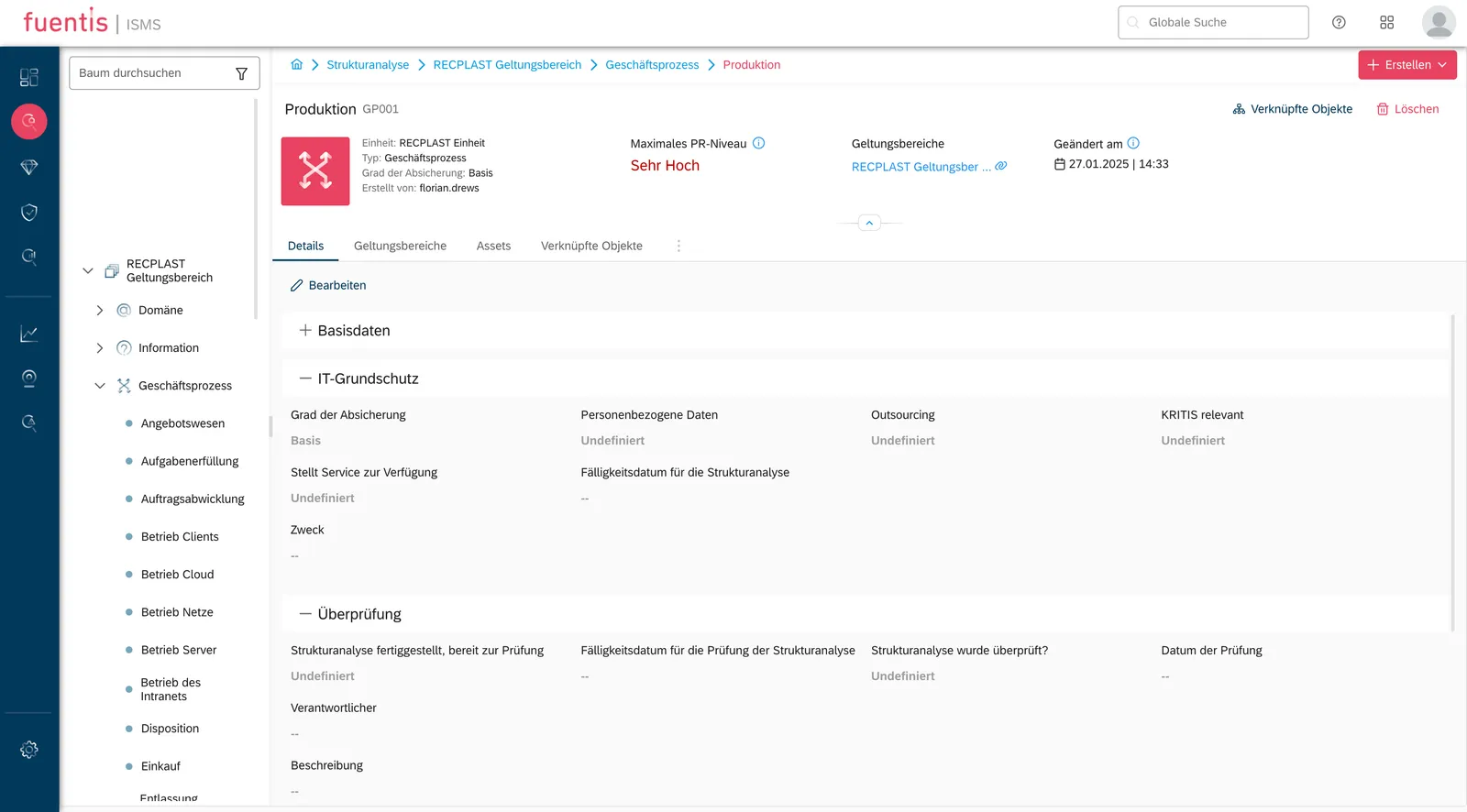
Section titled “Navigation”When you are in the Structural Analysis phase, the navigation tree on the left side of the screen plays a central role. There you have an overview of all scopes and their target object groups. Using the arrows, you can expand the various scopes or target object types. When you hover over a scope with the mouse, you see an “arrow in circle” symbol; clicking on it takes you to the detail view of the scope. You can search and filter the tree to get to the desired entries faster.
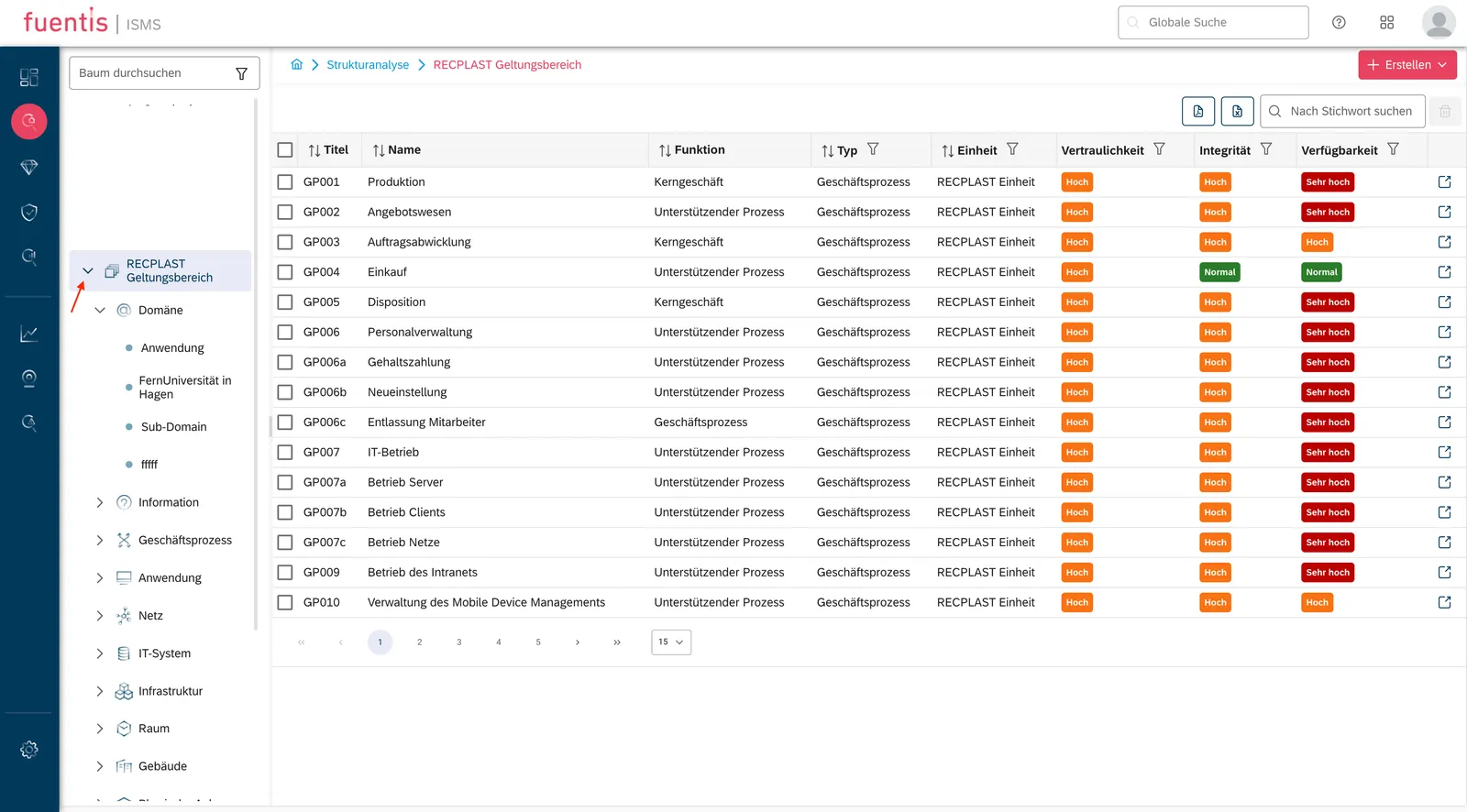
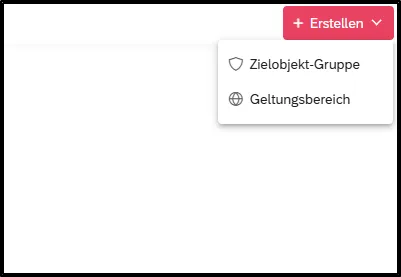
You can use the button at the top right -


Note: When you click on target object types (e.g., Information, Business processes, etc.), you see a tabular overview of all target objects of this type within the respective scope. When you click on a target object, you see the respective detail view of the target object.
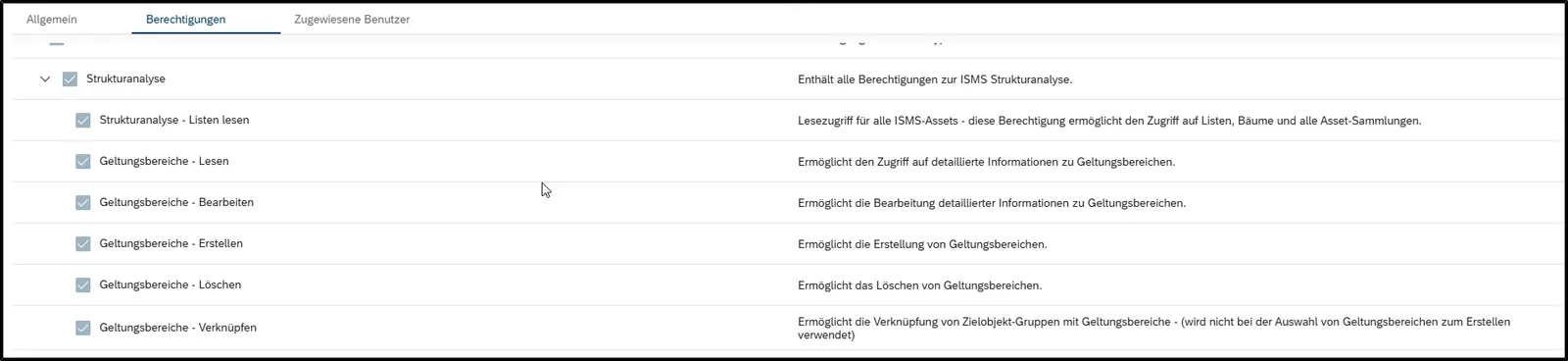
Note: The main tree is only visible for users with the active permission “Structural Analysis – Read Lists.”
The Scope defines the boundaries of your ISMS (cf. security concept) and determines which parts of the organization – including processes, systems, and information assets – are covered by the ISMS. It encompasses all infrastructural, organizational, personnel, and technical components that serve task fulfillment in a specific application area.
Important Properties:
- Every entity in fuentis automatically has a default scope
- Additional scopes can be created manually
- Clear delineation of areas to be protected
- Basis for the entire ISMS implementation
Scope Detail View
Section titled “Scope Detail View”In the upper part of this view is the status bar, which displays some basic information about the scope: Name, Title, etc. - This status bar can be collapsed using the “arrow up.”

Below the status bar are the various attributes and fields that can be filled out. You will find two tabs there, “Details” and “SBF Definitions.”

Details Tab:
- Basic Data - Information about the scope name, title, status, etc.
- IT-Grundschutz - Data related to IT-Grundschutz for the selected scope (protection level, relevance for KRITIS, handling of personal data, etc.)
- Reviewed - Information about the review process of the Structural Analysis (was the inventory analysis reviewed, who was reviewed, when was this process carried out, etc.)
- Approved - Information about the approval process of the Structural Analysis (was the Structural Analysis approved, who was approved, when was this process carried out, etc.)
You can collapse the work areas by clicking on the “plus” symbol.
SBF Definitions Tab
On this tab, the protection requirements (PR categories) are defined. Input is made in three sections:
- PR Category – Normal
- PR Category – High
- PR Category – Very High
Each section contains identical, editable fields in which the impacts in case of damage can be described. Typical fields are, for example:
- Violation of laws, regulations, or contracts
- Impairment of the right to informational self-determination
- Financial consequences
- Physical injury
This information helps to make the assessment of individual values in the context of information security comprehensible and consistent.
Note: You can create multiple scopes and thus map the concept of “services,” cf. “modular security concepts.” You can add target objects to multiple scopes. You can also link target objects across different scopes and thus map complex organizational structures. If you need help with mapping, please feel free to contact us. In a joint workshop, we can certainly help you.
Note: Entities are objects in which all relevant information can be stored. This includes in particular users, roles & rights, scopes, and target objects. You can find more information on this topic in the Rights & Roles section.
Target Object Groups (TOGs)
Section titled “Target Object Groups (TOGs)”TOGs are logical groupings of similar assets or information values. This grouping simplifies management and ensures consistent protective measures.
The 12 TOG Types in fuentis:
- Domain - Superordinate organizational areas
- Information - Data and information stocks
- Business Process - Operational and supporting processes
- Application - Software and applications
- IT System - Servers, clients, network components
- Network - Network infrastructure
- Room - Server rooms, offices
- Employee - Personnel resources
- Physical Facility - Hardware, equipment
- Building - Locations and properties
- Infrastructure - Supporting systems
- Outsourcing - External service providers
Authorization Concept (Structural Analysis)
Section titled “Authorization Concept (Structural Analysis)”For working with the structural analysis, users need specific roles and permissions:
Global Role
Section titled “Global Role”- ISMS_INVENTORY_ANALYSIS_ACCESS - Basic requirement for access
Detailed Permissions
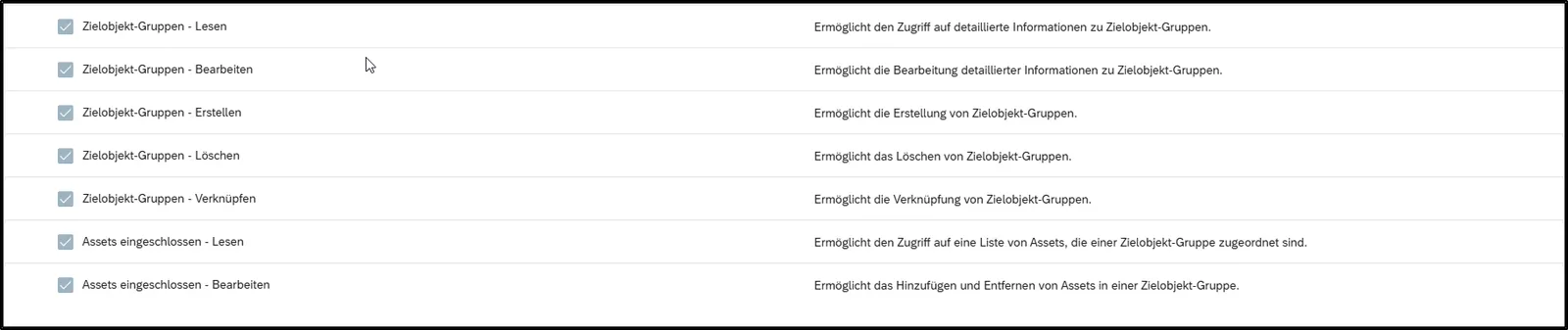
Section titled “Detailed Permissions”Note: You can read more about the authorization concept of the fuentis Suite in the Permissions section. It is important that roles must be created and assigned independently. Simply assigning the “Global Access Roles” is not sufficient to gain access to individual areas.
For Scopes:
- Scopes - Read
- Scopes - Create
- Scopes - Edit
- Scopes - Delete
- Scopes - Link
For Target Object Groups:
- Target Object Groups - Read
- Target Object Groups - Create
- Target Object Groups - Edit
- Target Object Groups - Delete
- Target Object Groups - Link
Practical Implementation
Section titled “Practical Implementation”1. Define Scope
Section titled “1. Define Scope”Preparation:
- Analyze organizational structure
- Identify critical business processes
- Document IT landscape
- Record locations and employees
In fuentis Suite:
- Navigation: ISMS Module → Structural Analysis
- Button “Create” → “Scope”
- Fill in mandatory fields:
- Name: Unique designation
- Title: Descriptive short form
- Status: Current state
- IT-Grundschutz Data: Protection level, KRITIS relevance


Practice Tip: Start with a manageable scope and expand it gradually. An overly broad initial definition often leads to complexity and resource problems.
Note: After opening the detail view of a scope, you can permanently delete it there using the delete button. Attention: there is no trash function.
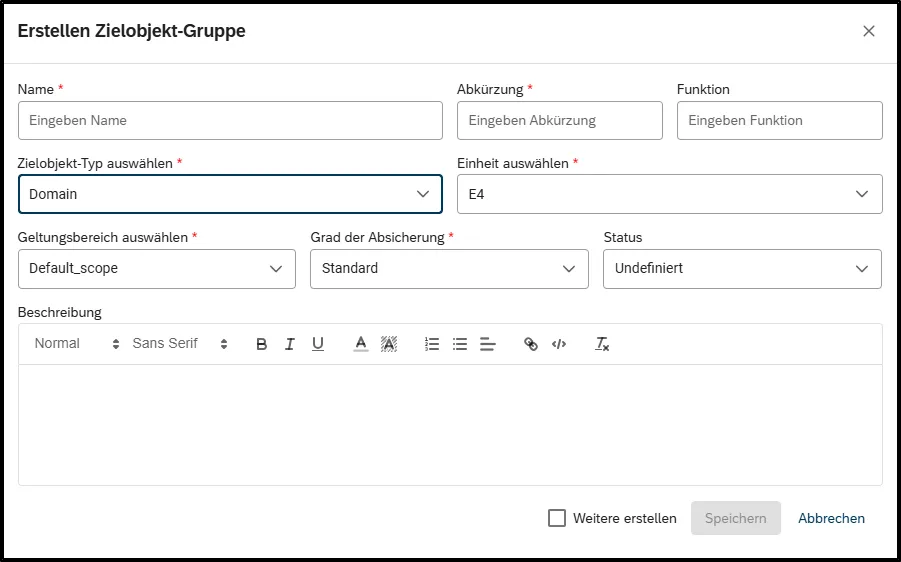
2. Create Target Object Groups (ZOG/TOGs)
Section titled “2. Create Target Object Groups (ZOG/TOGs)”

Systematic Approach:
-
Record Business Processes (GP001, GP002…)
- Identify core processes
- Document support processes
- Record dependencies
-
Inventory Applications (A001, A002…)
- Identify critical software
- Link with business processes
- Document interfaces
-
Record IT Systems (S001, C001, L001…)
- Group servers
- Consolidate client systems
- Record network components
-
Document Premises (R001, GB001…)
- Server rooms
- Office buildings
- External locations
Best Practice for Naming Conventions:
[Type-Abbreviation][Number] [Description]Examples:- GP002 Quotation Process- A022 CRM System- S015 Exchange Server- R001 Server Room 3rd FloorNote: You can customize the automatic title creation. You can find this setting in the ISMS settings (gear symbol at the bottom left).
Practice Tip: Status: Choose the status of the target object group here.
- Planned/In Conception – Important for the planning phase before implementation.
- Ordered/In Creation – Signals that something is officially ordered or in the manufacturing process.
- Provided – Object or resource is available but not yet in use.
- In Test – Required when tests are necessary before commissioning.
- In Operation – Standard status for actively used resources or processes.
- Defective – Necessary to mark problems or errors.
- In Repair/In Exchange – Important for service and maintenance processes.
- Decommissioned – Required for end-of-life management (e.g., for IT hardware or machines).
Term Definition: The terms Target Object; ZO (Target Object; TO), Target Object Group; ZOG (Target Object Group; TOG) and Asset, Asset Groups are easily confused. The terms Target Object (ZO), Target Object Group (ZOG) as well as Asset and Asset Group are often used similarly but have different meanings:
-
Target Object (ZO / Target Object, TO):
A single, concrete object that is considered within the scope – e.g., a server, a business application, or a building. -
Target Object Group (ZOG / Target Object Group, TOG):
A group of target objects with common properties that can be managed or assessed together – e.g., “Client PCs in Sales” or “Data Center North.” -
Asset / Asset Group:
Assets can be both material (e.g., hardware, rooms) and immaterial (e.g., data, reputation). Assets in the fuentis Suite are “real” unique “Configuration Items” and are also considered as such in Asset Management. You can learn more about Asset Management in the Asset Management section.
Status and Detail View
Section titled “Status and Detail View”In the upper part of this view is the status bar, which displays some basic information about the TOG: Name, Title, etc. You will also find the “Delete” and “Linked Objects” buttons.

Similar to scopes, you will also find several tabs in the detail view area for target objects. Here you can navigate to the individual functions.
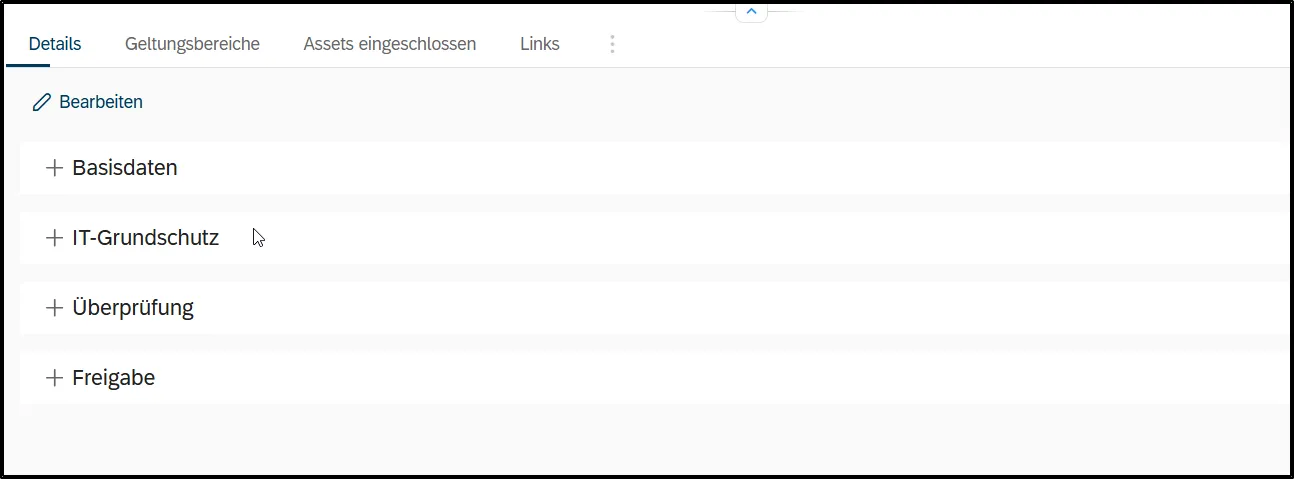
In the “Details” tab you will find the following sections:
- Basic Data: Information about the name, title, status, etc. of the TOG.
- IT-Grundschutz: Data on IT-Grundschutz for the selected TOG (protection requirements, relevance for KRITIS, handling of personal data, etc.).
- Reviewed: Information about the review process of the structural analysis (was the structural analysis reviewed, who reviewed, when was this process carried out, etc.).
- Approved: Information about the approval process of the structural analysis (was the structural analysis approved, who approved, when was this process carried out, etc.).
Delete
Section titled “Delete”You can permanently delete a TOG in its detail view using the “Delete” button. Attention: there is no trash function.
Note: You can only delete TOGs that are not linked to other objects. You must first remove all links.
3. Link Target Object Groups
Section titled “3. Link Target Object Groups”Understanding TOG Hierarchies
Section titled “Understanding TOG Hierarchies”fuentis follows a logical hierarchy for TOG linking based on the 12 predefined types. Understanding these relationships is crucial for proper structural analysis:
Hierarchy Overview:
- Domain (highest level) encompasses all organizational areas
- Information and Business Process are core operational elements
- Application supports business processes
- IT System hosts applications
- Network and Infrastructure support IT systems
- Room and Building provide physical housing
- Physical Facility and Employee are foundational resources
- Outsourcing can be subordinate to any other type
Detailed Hierarchy Rules:
- Domain is superordinate to all other TOG types.
- Information is subordinate to Domain and superordinate to Business Process.
- Business Process is subordinate to Domain/Information and superordinate to Application/Outsourcing.
- Application is subordinate to Domain/Information/Business Process and superordinate to IT System, Physical Facility, Employee, Outsourcing.
- IT System is subordinate to Application and superordinate to Network, Infrastructure, Room, Physical Facility, Employee, Outsourcing.
- Network is subordinate to IT System and superordinate to Employee/Outsourcing.
- Room is subordinate to IT System/Infrastructure and superordinate to Building, Physical Facility, Employee, Outsourcing.
- Building is subordinate to Room and superordinate to Employee, Outsourcing, Physical Facility.
- Physical Facility is subordinate to Application, IT System, Infrastructure, Room, Building and superordinate to Employee.
- Employee is superordinate to multiple TOGs but can be subordinate to Outsourcing.
- Outsourcing is always subordinate to other TOGs but cannot be superordinate to any parent TOG.
Linking Rules:
- Domains can be linked with all subordinate ZOG types
- Business processes connect with applications and outsourcing
- IT systems need links to network and infrastructure
- Employees are assigned to relevant systems and rooms
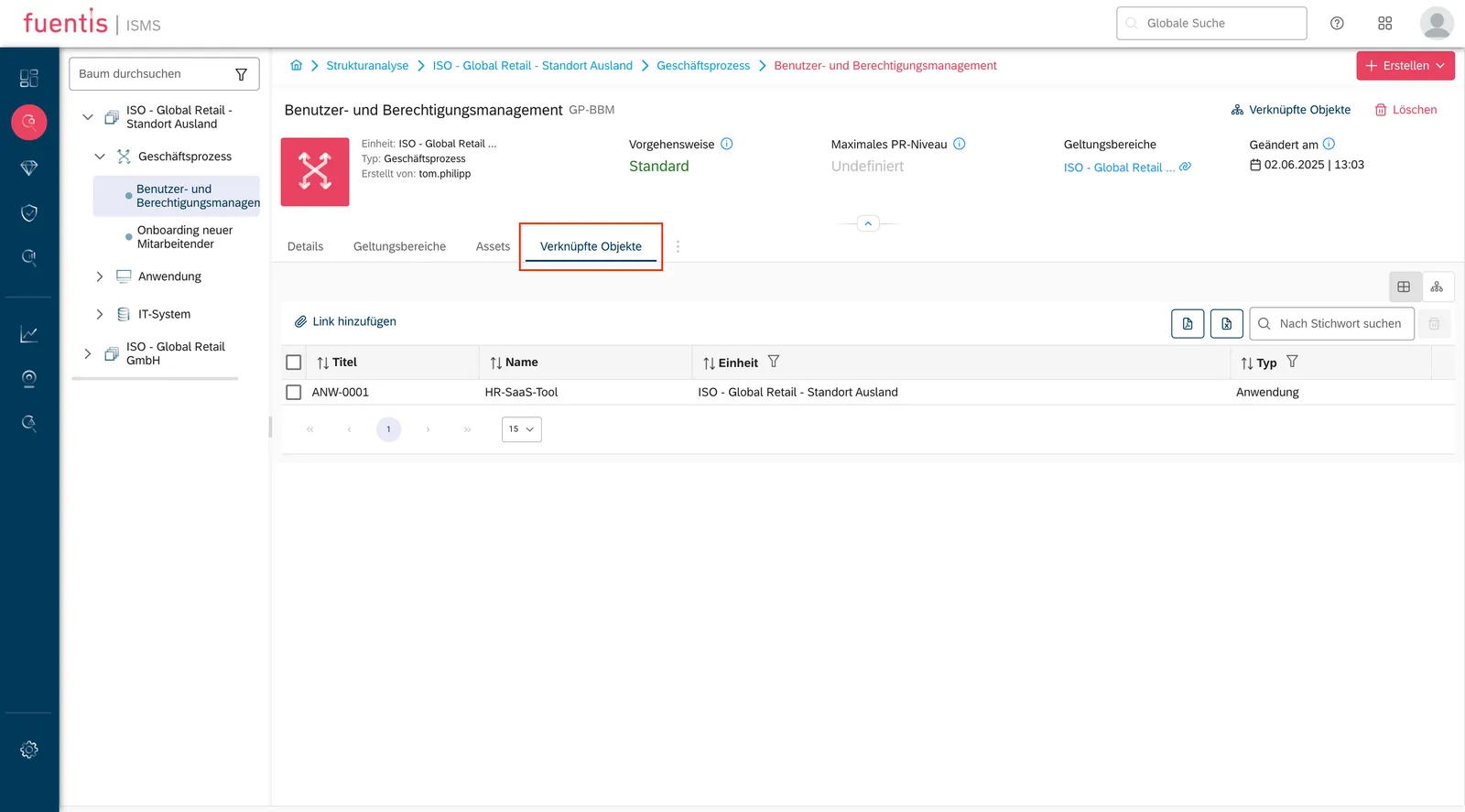
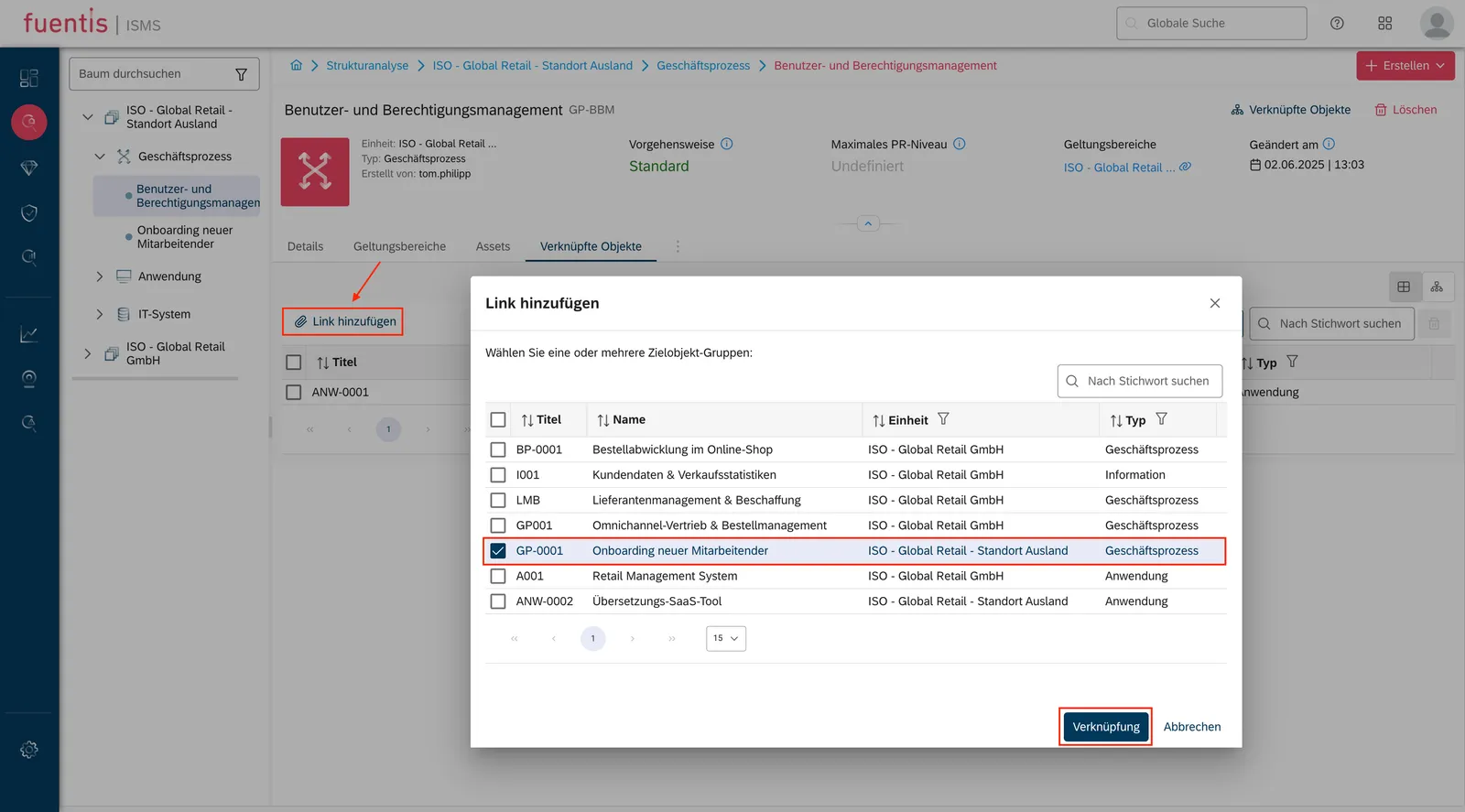
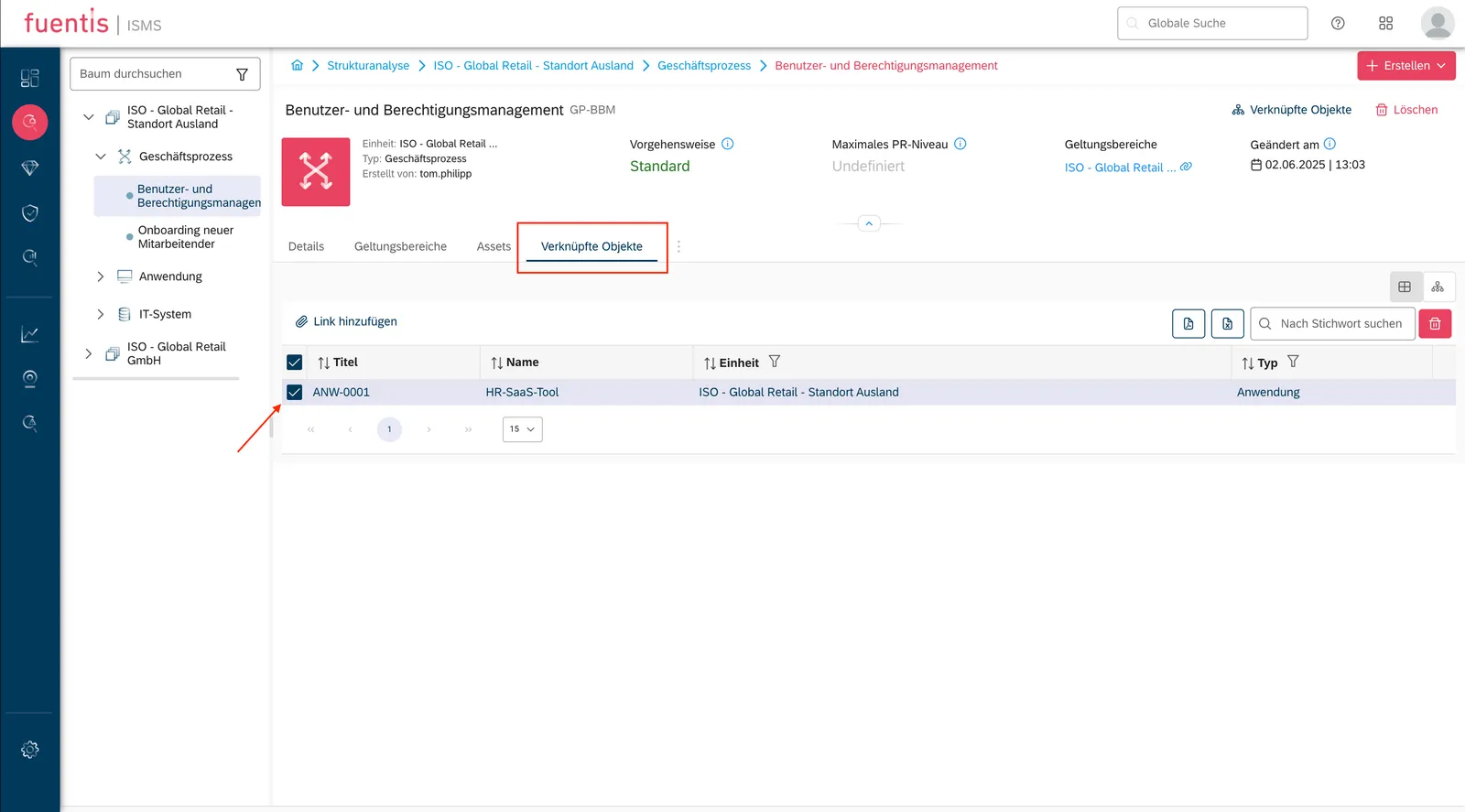
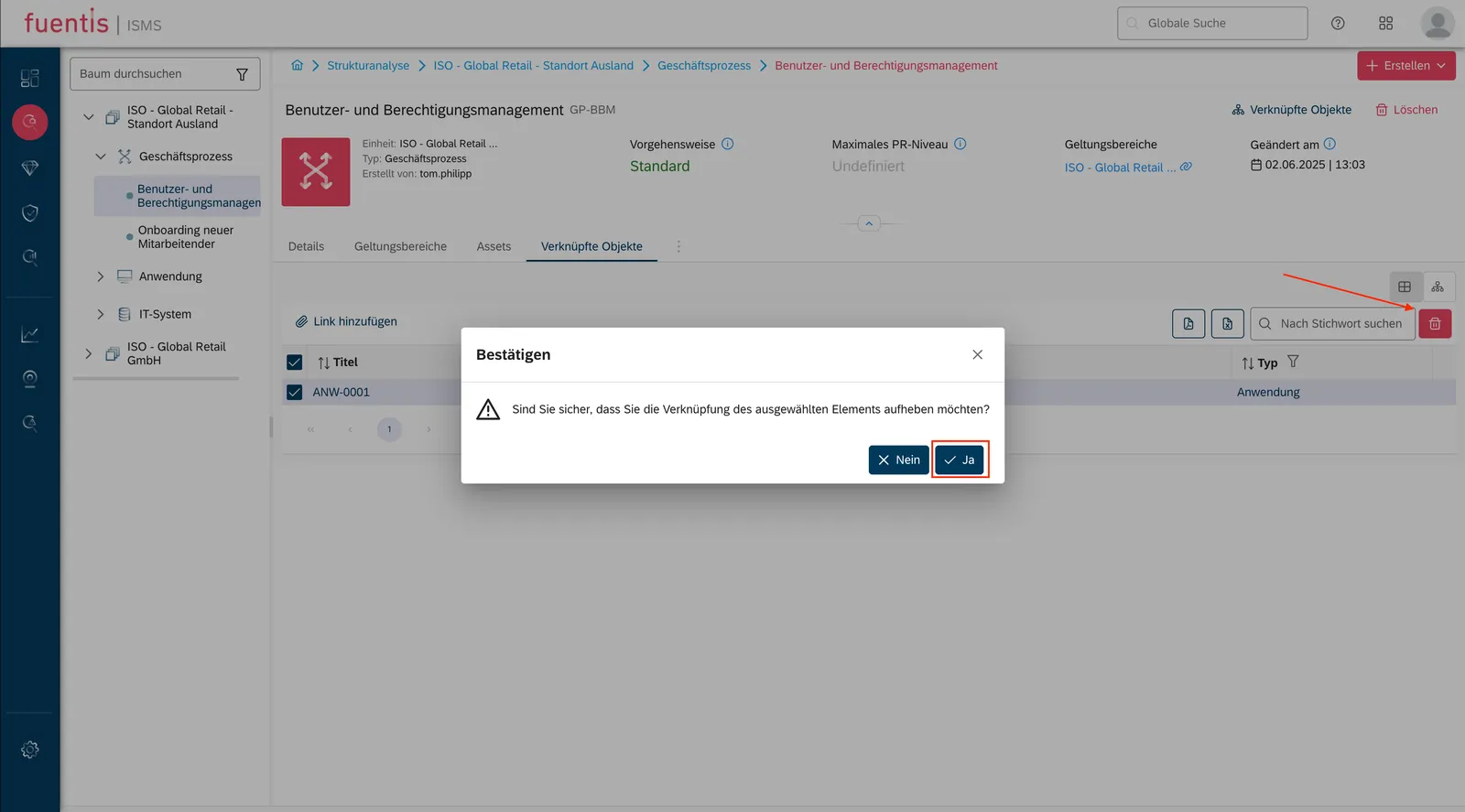
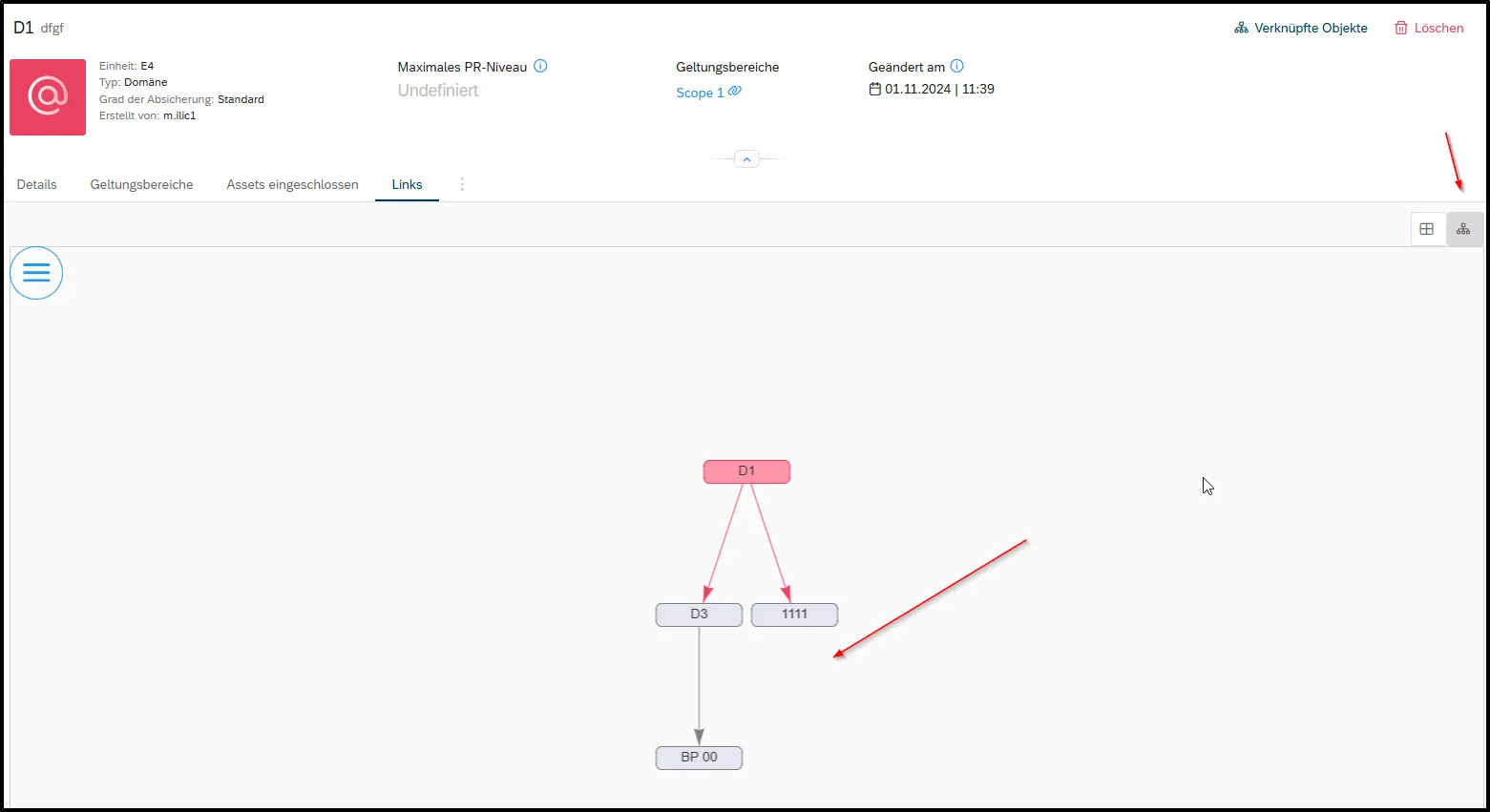
Practice Tip: Use the “Linked Objects” view in fuentis to visualize direct and indirect dependencies. Red arrows show direct, gray arrows show indirect links. You can find this button in the left area below the status bar. There you can switch between table view and tree view.
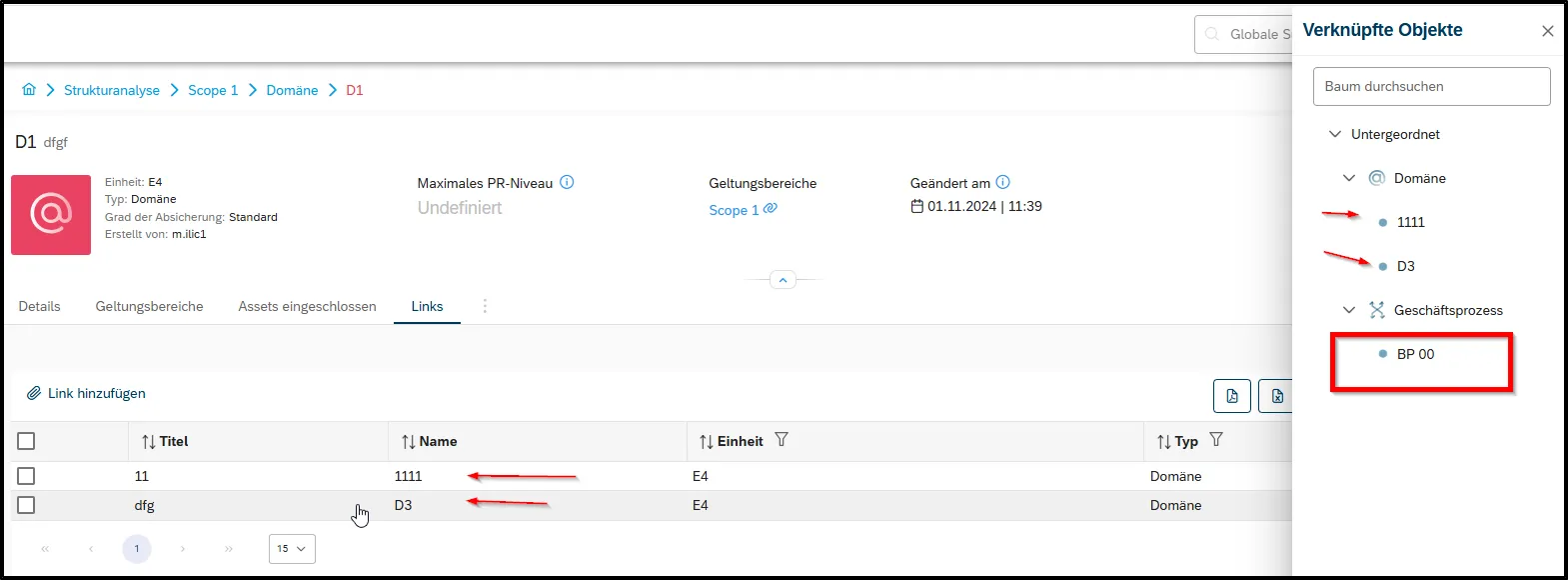
Practice Tip: Use the blue hierarchy level in the upper area of the screen. Here you can navigate quickly and always keep track of where you currently are. You can also always open a left sidebar via the “Linked Objects” button in the upper right area, which enables quick navigation to all indirect links. You can expand and select objects like in the main navigation tree.
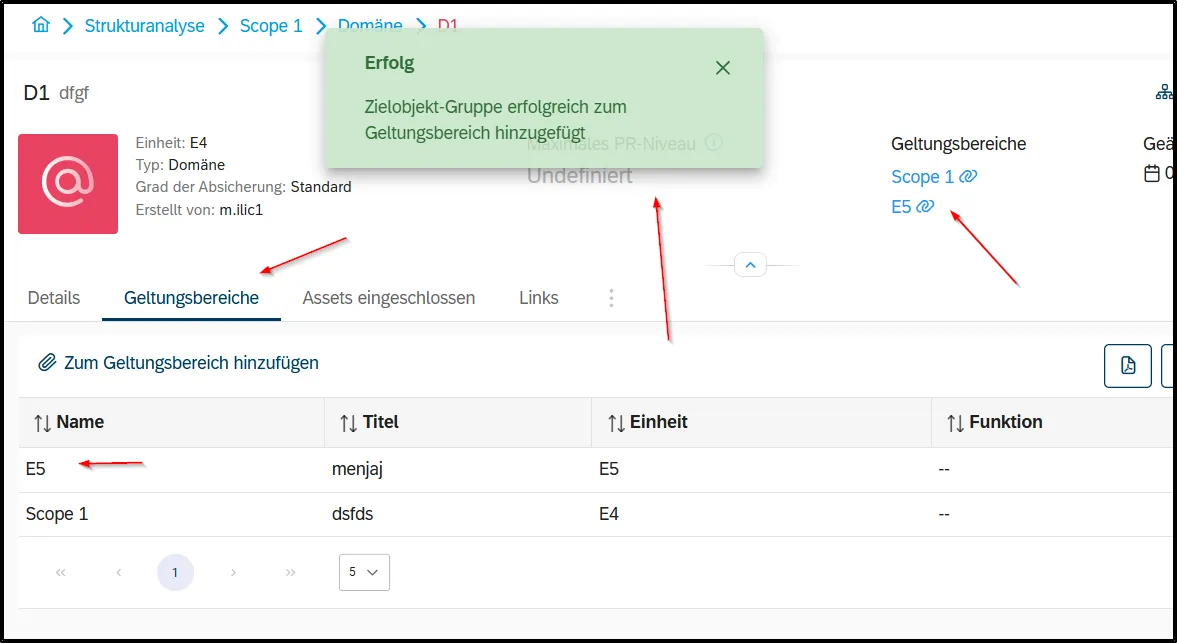
Assign ZOGs to Scopes
Section titled “Assign ZOGs to Scopes”Target object groups can be assigned to one or more scopes.
4. Assign Assets
Section titled “4. Assign Assets”Concrete assets are assigned to TOGs in the “Included Assets” tab:
- Select TOG
- Open “Included Assets” tab
- Click “Add” button
- Select and assign relevant assets
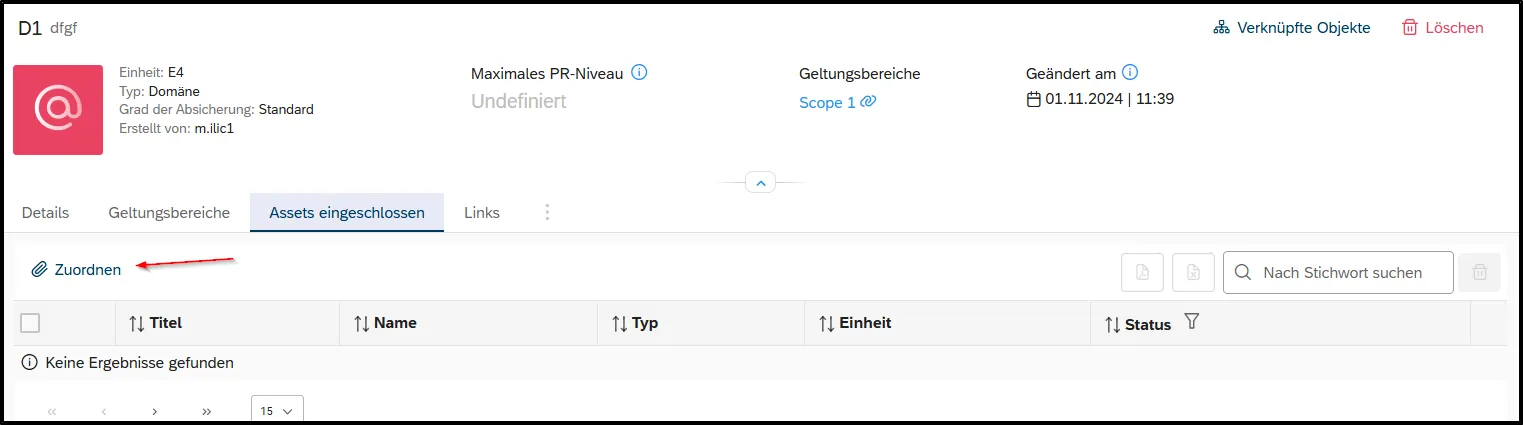
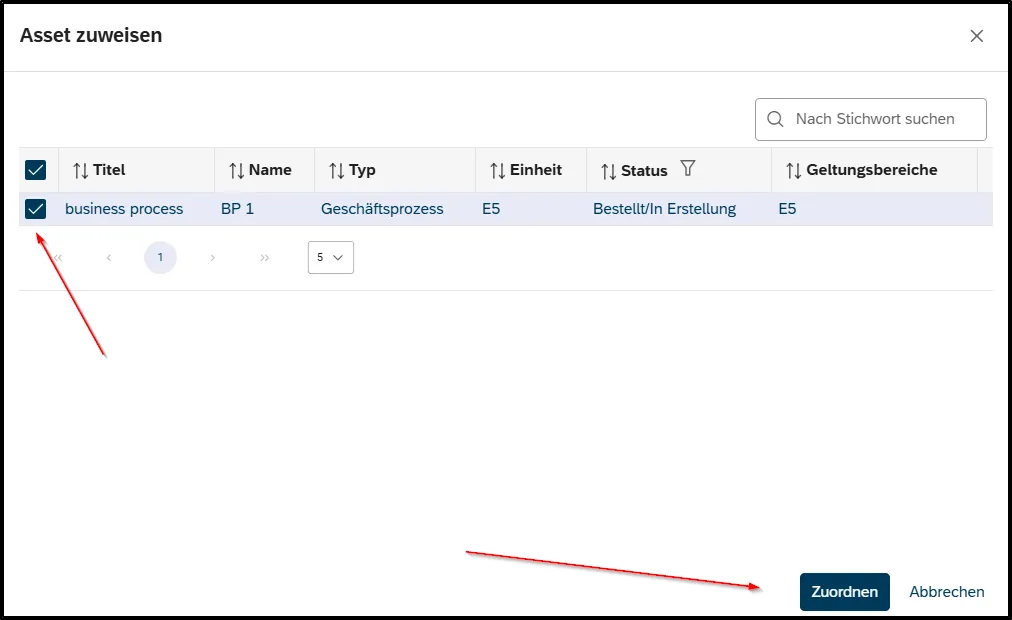
Note: If you do not have permissions for the Asset Management model, you cannot assign assets. Also make sure that you have already added assets to your Asset Management.
Practice Tip: Start without assets first, as these often change faster than the “abstract” form of your security concept through updates or device replacement. You can therefore basically create your ISMS first based on the target object groups.
Integration with ISO 27001 and IT-Grundschutz
Section titled “Integration with ISO 27001 and IT-Grundschutz”ISO 27001 Compliance
Section titled “ISO 27001 Compliance”The structural analysis in fuentis meets the requirements of ISO 27001:
- Clause 4.3: Definition of ISMS scope
- Clause 8.1: Asset inventory
- Annex A.8: Asset Management Controls
IT-Grundschutz Integration
Section titled “IT-Grundschutz Integration”For each TOG, IT-Grundschutz-specific data can be recorded:
- Protection Requirements: Normal, High, Very High
- KRITIS Relevance: Critical infrastructures
- Personal Data: Data protection relevance
- Availability Requirements: SLAs and RPO/RTO
How the fuentis Suite Supports
Section titled “How the fuentis Suite Supports”Automation and Efficiency
Section titled “Automation and Efficiency”- Templates: Reusable TOG templates
- Bulk Operations: Mass editing of TOGs (Additional functions are on the roadmap)
- Export: Excel integration for inventory data
- Inheritance: Automatic protection requirements inheritance
Visualization and Reporting
Section titled “Visualization and Reporting”- Main Tree View: Hierarchical display of all elements
- Dependency Diagrams: Graphical link representation
- Audit Trail: Complete change documentation
- Dashboard: Real-time overview of ISMS status
Workflow Integration
Section titled “Workflow Integration”- Review Process: Structured review
- Approval Workflows: Multi-stage approvals
- Notifications: Automatic status updates
- Role-based Views: Customized user interfaces
Common Challenges and Solutions
Section titled “Common Challenges and Solutions”Challenge: Too Detailed Structural Analysis
Section titled “Challenge: Too Detailed Structural Analysis”Problem: Hundreds of individual assets complicate management
Solution: Group similar assets into TOGs, e.g., “Office PCs Floor 3” instead of individual computers
Challenge: Unclear Dependencies
Section titled “Challenge: Unclear Dependencies”Problem: Cascade effects during failures not recognizable
Solution: Systematic linking of all TOGs, regular review of dependencies
Challenge: Missing Documentation
Section titled “Challenge: Missing Documentation”Problem: Existing IT landscape not completely recorded
Solution: Gradual recording, use of automatic discovery tools, workshops with IT managers
Challenge: Import of Existing Information
Section titled “Challenge: Import of Existing Information”Problem: You already have a list of assets you want to import.
Solution: We can work with you to find a solution for how to automatically import this content into the fuentis Suite. Please feel free to contact us!
Next Steps
Section titled “Next Steps”After completing the structural analysis, the following steps follow:
- Protection Requirements Assessment: Assessment of criticality
- Risk Analysis: Identification of threats
- Measure Planning: Definition of security controls
- Implementation: Implementation of measures
- Monitoring: Continuous improvement
Introduction Video
Section titled “Introduction Video”Key Messages at a Glance
Section titled “Key Messages at a Glance”- Foundation of Information Security: Protection requirements assessment is not a bureaucratic obligation, but the basis for effective and efficient security measures.
- Three Protection Objectives in Focus: Confidentiality, integrity, and availability must be individually assessed for each asset and categorized as normal/high/very high.
- Consider Inheritance: Protection requirements are inherited from business processes through applications to IT systems – maximum principle or cumulation effects can lead to higher protection requirements.
- Use Tool Support: The fuentis Suite automates many aspects of protection requirements assessment and ensures consistent implementation through workflows and questionnaires.
- Continuous Process: Protection requirements assessment is not a one-time task but must be updated when IT landscape or business processes change.
- Structural Analysis is the Foundation: No effective ISMS without clear inventory.
- Scope Defines Boundaries: Focusing on the essential saves resources.
- TOGs Simplify Management: Logical grouping instead of individual management.
- Links Show Dependencies: Critical paths become visible.
- fuentis Suite Automates: Workflows and templates accelerate implementation.
This article is based on the best practices of ISO 27001:2022 and BSI IT-Grundschutz. The described functions refer to fuentis Suite Version 4.