

BSI IT-Grundschutz - Quickstart Guide
What awaits you here?
Section titled “What awaits you here?”1. Scope (Geltungsbereich)
Define which parts of your organization should be covered by the protective measures of IT-Grundschutz. A clearly defined scope makes it easier for you to structure your security measures later on.
2. Structural analysis
Record all relevant assets and transfer them into a clear structure. This creates the basis for a systematic recording of threats and risks.
3. Determination of protection requirements
Determine the protection requirements of your assets to be able to prioritize in a targeted way. You will receive an assessment of how critical certain processes, systems, or information are.
4. Modeling
Use the BSI building blocks to adapt measures and requirements to your specific infrastructure. Modeling makes it easier for you to select the appropriate security measures.
5. IT-Grundschutz Check (target–actual comparison)
Compare your current security status with the requirements of BSI IT-Grundschutz. This allows you to identify gaps and prioritize targeted improvement measures.
6. Risk analysis
Once you have defined the protection requirements, assess all identified risks and initiate appropriate countermeasures. This continuously increases your organization’s level of protection.
Next steps
Section titled “Next steps”- 1. Read the introductory chapter: Get an initial overview of how BSI IT-Grundschutz is structured.
- 2. Define your scope: Start with a clear delimitation of your project so that you can derive measures in a targeted manner.
- 3. Conduct the structural analysis: Use our guides to record all assets and relevant process building blocks.
- 4. Determination of protection requirements & modeling: Link the results of the structural analysis with the BSI building blocks and determine the necessary protection requirements.
- 5. Conclude with the IT-Grundschutz Check: This ensures that your security level meets current requirements and you know which gaps still need to be closed.
Scope (Geltungsbereich)
Section titled “Scope (Geltungsbereich)”1. What is the scope for and what is it intended to cover?
Section titled “1. What is the scope for and what is it intended to cover?”A scope comprises the entirety of infrastructural, organizational, personnel, and technical components that serve to fulfill tasks in a specific application area of information processing.
This means the scope must clearly define which area of the company you want to depict in the ongoing process. In fuentis, you must create at least one scope per unit, but you can also create several.
The company Beispiel GmbH is used below for illustration, analogous to the BSI’s RECPLAST GmbH.
Important: The BSI also often refers to the scope as an Informationsverbund (information network).
Practical tip: “Ongoing process” means: the scope is continuously maintained, reviewed, and adjusted—not defined once and then forgotten. You can create tasks for regular monitoring; for example, for an annual review.
2. Why is the scope important?
Section titled “2. Why is the scope important?”A clearly defined scope is crucial to the success of an ISMS because it:
- delineates the boundaries of the ISMS within the organization,
- clarifies responsibilities and accountabilities related to information security,
- focuses the organization’s resources and efforts on the most relevant and critical areas.
3. How do I define a scope?
Section titled “3. How do I define a scope?”3.1 Define the scope
Section titled “3.1 Define the scope”As described, you must clearly define and delimit the scope. To start, a general definition is sufficient; in the next steps you further narrow down the scope.
Beispiel GmbH defines the scope as follows:
- Short name: Beispiel GmbH
- Full designation: Beispiel GmbH with all business processes, applications, and IT systems used to provide production.
With the following points, you will work your way deeper into the scope:
3.2 Organizational structure
Section titled “3.2 Organizational structure”The organizational structure of the scope is created through an organizational chart. In the case of Beispiel GmbH, this would be an organizational chart of the entire company, since the scope also relates to the entire company.
Practical tip: Use whiteboard tools such as Microsoft Vision or Draw.io to create an organizational chart. Update it regularly. You can link or attach this in the scope definition in the fuentis Suite.
3.3 Sites and employees
Section titled “3.3 Sites and employees”Define which sites and employees belong to the scope. You can create these as target objects in the fuentis Suite.
Example:
The purchasing, marketing, and sales departments are located in the building in Bad Godesberg. The company employs around 500 people in total, 175 of whom work in administration in Bad Godesberg.
Practical tip: To avoid losing track, first note down all relevant information outside the tool. Then work through the information step by step and enter it into the fuentis Suite. If you need support, feel free to contact us at any time.
3.3 Network diagram
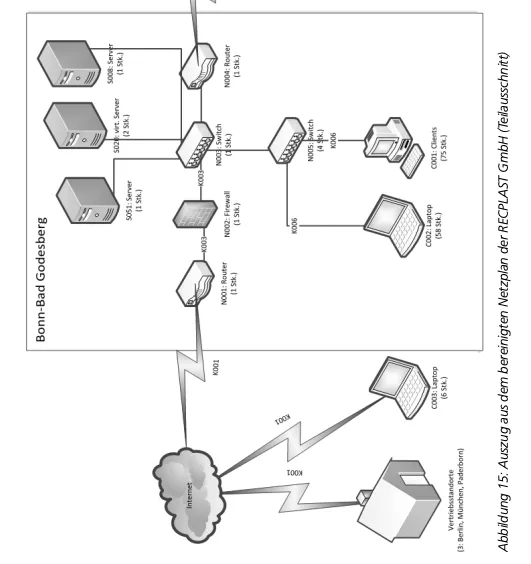
Section titled “3.3 Network diagram”Create a network diagram for the scope. The network diagram is not only helpful for the subsequent phases of establishing an ISMS, but it also helps you in step 5.
Alternatively, a network diagram can be created with applications such as Microsoft Visio.
3.4 What must be included in the network diagram?
Section titled “3.4 What must be included in the network diagram?”- IT systems, i.e., client and server computers, active network components (switches, routers, WLAN APs), network printers, etc.
- ICS and IoT components with network connections (clients, hand scanners, industrial printers, PLCs, control cabinets, etc.)
- Network connections between these systems (LAN such as Ethernet, WLAN, backbone technologies, etc.)
- Connections to the outside (e.g., dial-in access via ISDN/modem, internet connections, radio links, leased lines to remote sites, etc.)
3.5 Information technology
Section titled “3.5 Information technology”Define the information technology in scope. Describe in detail which components are involved and what they are used for.
Briefly describe technology & services with purpose and responsibility:
- On-prem: e.g., ERP server (production), file services (docs)
- Cloud/SaaS: e.g., CRM, HR suite, ticket system (incl. tenant/region)
- OT/ICS: e.g., line PLCs, HMI, historian
- Endpoints & peripherals: clients, mobile, printers, scanners
- Shared services: AD/Entra ID, PKI, backup, MDM, monitoring
Practical tip: In fuentis, create as target objects with owner, criticality, and dependencies.
Practical tip: You may be able to use IT inventory lists.
4. Scope in fuentis
Section titled “4. Scope in fuentis”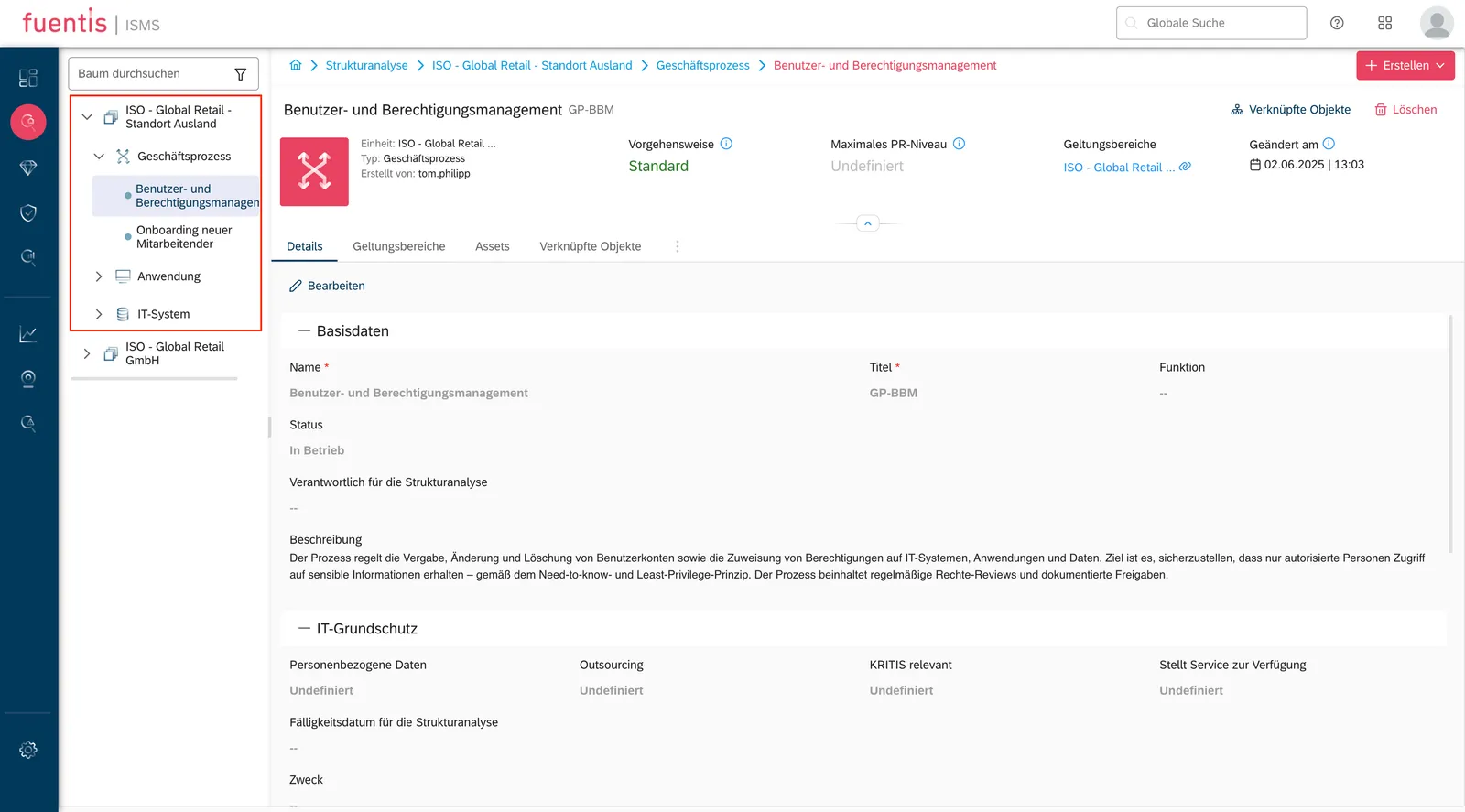
Structural analysis
Section titled “Structural analysis”1. Structural analysis
Section titled “1. Structural analysis”The structural analysis is the first step in the process of establishing an ISMS. In this phase, the entire (IT) infrastructure of a scope is recorded and documented. The goal is to gain a clear understanding of the existing (IT) landscape in order to recognize and assess risks on this basis.
Practical tip: Use the preparatory work for the scope definition and set up a uniform storage location where you centrally record these documents, e.g., a dedicated SharePoint.
2. Preparation
Section titled “2. Preparation”2.1 Does documentation already exist?
Section titled “2.1 Does documentation already exist?”Check whether inventories/inventory lists, process management tools, software lifecycle tools, or similar are available (possibly spread across multiple sources). Take these into account.
If documentation is available: import it into fuentis and still carry out the steps of the structural analysis to avoid errors or missing assets.
2.2 Where do you start?
Section titled “2.2 Where do you start?”The starting point is to take stock of the physical and virtual IT components.
2.3 How is a structural analysis implemented?
Section titled “2.3 How is a structural analysis implemented?”By systematically inventorying all hardware and software components as well as analyzing the network structure and business processes.
For a detailed description of the fuentis Suite functions that support the structural analysis, please search for “Strukturanalyse” in the Service Hub or speak to our experts personally.
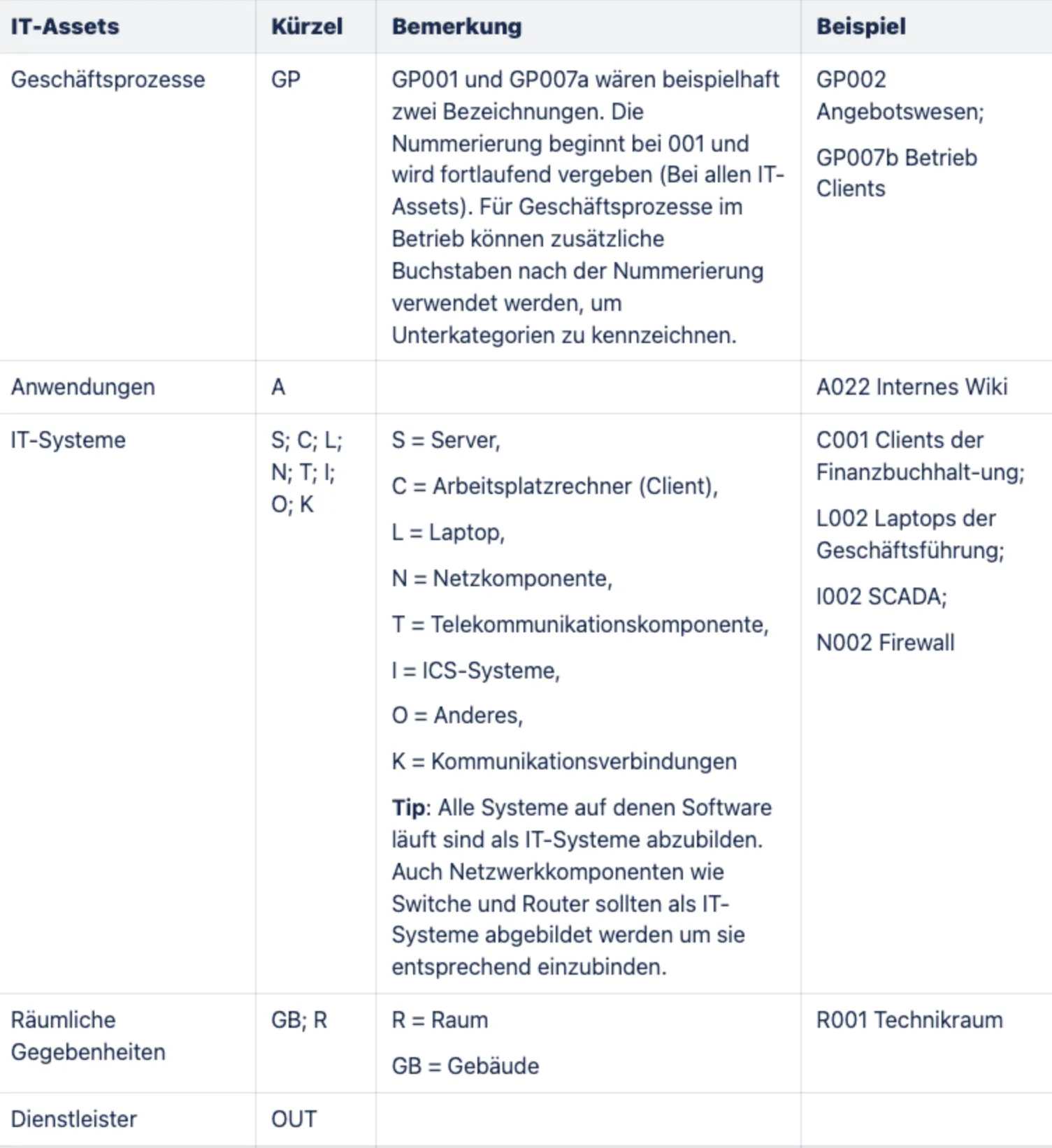
2.4 How are the Target Object Groups (TOG) formed?
Section titled “2.4 How are the Target Object Groups (TOG) formed?”Target objects are groups of similar assets—that is, things that you can manage together in your information security management. These can be, for example, servers, networks, applications, or sites.
Instead of listing each individual device or system separately, you group similar elements together. This saves time and makes your ISMS clearer.
Examples:
- All Windows servers = 1 target object group
- All office PCs = 1 target object group
- All routers and switches = 1 target object group
Why this matters:
If a single device changes (e.g., a server is replaced), you don’t have to adapt your entire security concept anew—the group remains in place.
Tips:
- Keep your structural analysis as concise as possible.
- Consolidate IT systems as far as possible.
- It’s easier to expand the structure later than to shrink it.
- The security concept should not be affected by fluctuations in the asset landscape.
3. Implementation phase
Section titled “3. Implementation phase”3.1 Recording business processes, applications, and information
Section titled “3.1 Recording business processes, applications, and information”Record all business and control processes. This is done in the fuentis tool. The network diagram is an exception.
Many of these processes can be further subdivided—for example, server administration into the subprocesses of managing mail, file, and database servers, each of which includes activities such as patch management, backups, configuration, or documentation.
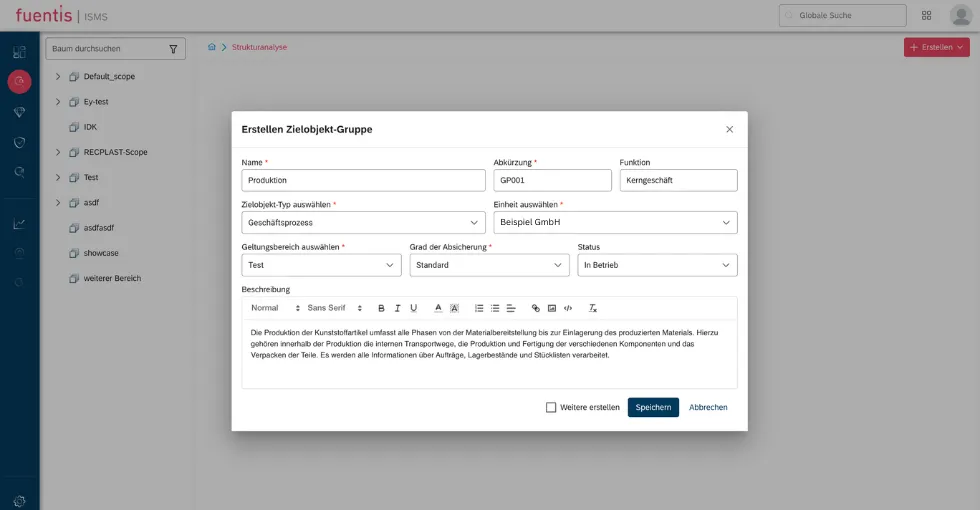
Record an asset in fuentis or create a target object:
3.2 Record process dependencies
Section titled “3.2 Record process dependencies”Record the dependencies of business and control processes.
3.3 Recording support processes
Section titled “3.3 Recording support processes”- Recording is analogous to recording business and control processes. Support processes can be linked in fuentis to the process they support.
- Linking the support processes becomes important later during the determination of protection requirements, in order to inherit the protection requirements accordingly.
3.4 Recording applications
Section titled “3.4 Recording applications”Just like support processes, all applications must be recorded and considered in the structural analysis. A target object is also created for this, but with a different “target object type.” The target object type can be selected when creating the target object, see above.
It is important that the applications are linked to all business and control processes with which the application is associated. For example, the payroll application must be linked to the HR management business process.
3.5 Recording IT systems
Section titled “3.5 Recording IT systems”When surveying IT systems, the aim is to compile the existing and planned IT systems and the respective information. These include:
- all IT systems present in the network (clients and servers), groups of IT systems and active network components, network printers, but also
- telecommunications components (such as PBXs, fax machines, and mobile phones), and
- IoT devices such as a voice assistant.
Important here is also the linking of related assets. For example: accounting clients should be linked to accounting.
3.6 Recording buildings
Section titled “3.6 Recording buildings”In the structural analysis, all relevant buildings and rooms in which assets, systems, or processes are operated should be recorded. These include, for example:
- Office and administrative buildings
- Data centers or server rooms
- Production halls or storage areas
Practical tip: For each building, note the address, usage (e.g., administration, production), and security-relevant areas (e.g., access control, server room).
3.7 Recording service providers
Section titled “3.7 Recording service providers”Record all external service providers that are relevant for the operation, maintenance, or provision of IT systems, applications, or processes. These include, for example:
- IT service providers or cloud providers
- Maintenance and support service providers
- Data center or hosting partners
- External administrators or outsourcing partners
Practical tip: Record which services the service provider provides and which security measures or contracts (e.g., data processing agreement, SLA) exist.
Determination of protection requirements
Section titled “Determination of protection requirements”1. Determination of protection requirements
Section titled “1. Determination of protection requirements”How much protection do information, applications, and associated technical systems/infrastructure need? How is the protection requirement justified in a comprehensible way? Which components require more security, and when are standard protection measures sufficient?
Goal: Selection of appropriate security measures for processes, information, applications, IT systems, rooms, and communication links.
2. Preparation phase
Section titled “2. Preparation phase”2.1 Definitions and starting point
Section titled “2.1 Definitions and starting point”The protection requirement determines the maximum damage that can occur if the CIA objectives for a target object—confidentiality, integrity, or availability—are violated.
-
Confidentiality – Information can be read only by authorized parties.
-
Integrity – Information can be changed only by authorized parties. All changes are authentic (authenticity) and cannot be repudiated.
-
Availability – Information is available at the right time and in the right place.
In the steps of implementation planning, these three protection goals are considered and classified into categories.
In addition, various damage scenarios and their potential impacts are assigned to the corresponding protection requirement categories.
2.2 Protection requirement categories
Section titled “2.2 Protection requirement categories”| Category | Definition |
|---|---|
| normal | The damage effects are limited and manageable. |
| high | The damage effects can be considerable. |
| very high | The damage effects can be existentially threatening/catastrophic. |
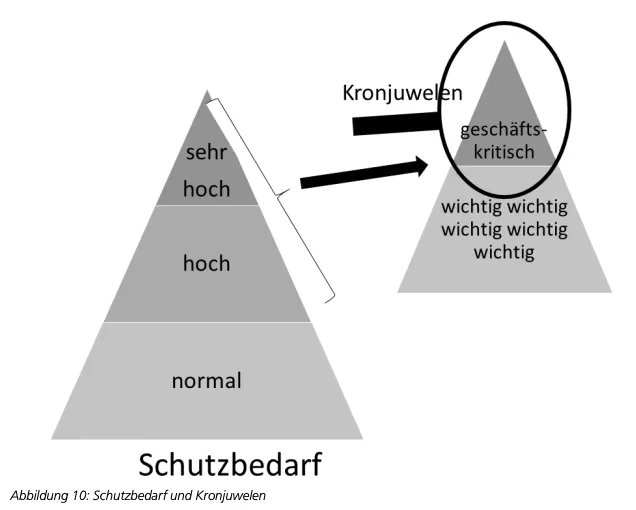
2.3 Damage scenarios
Section titled “2.3 Damage scenarios”Define thresholds per scenario to separate the categories. Typical scenarios:
- Violation of laws/regulations/contracts
- Impairment of the right to informational self-determination
- Impairment of personal physical integrity
- Impairment of task fulfillment
- Negative internal or external effects
- Financial impact
2.3.1 Damage scenario category “normal”:
Section titled “2.3.1 Damage scenario category “normal”:”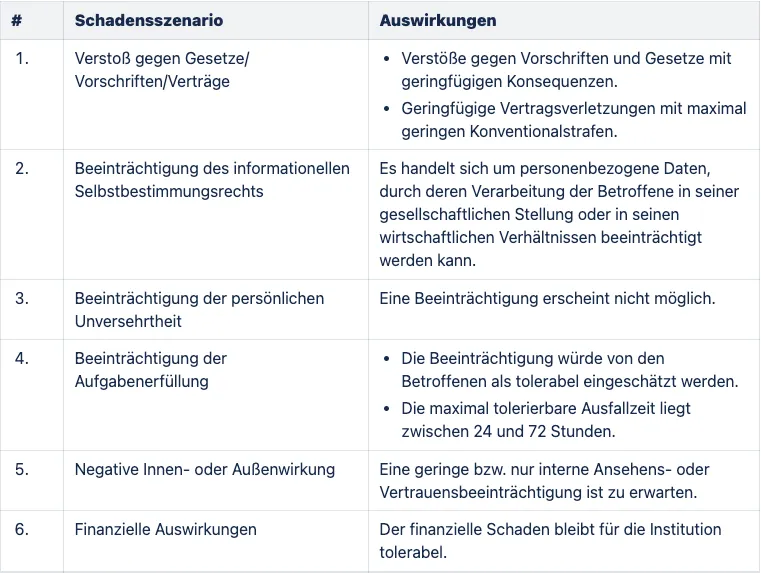
2.3.2 Damage scenario category “high”:
Section titled “2.3.2 Damage scenario category “high”:”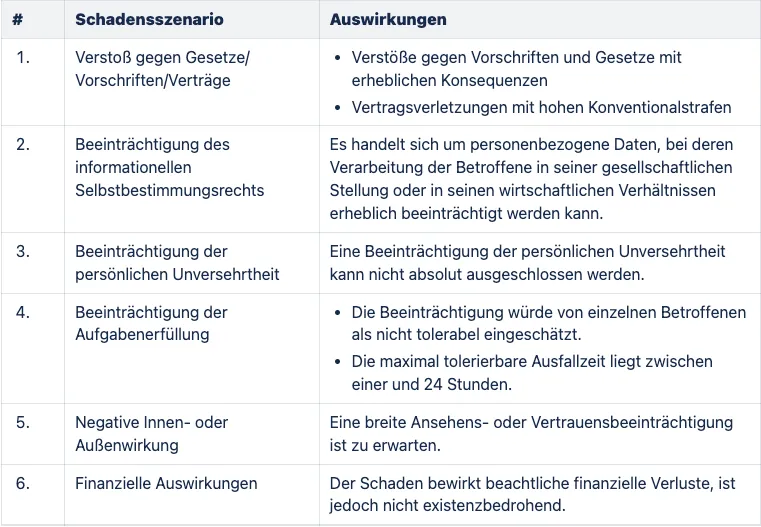
2.3.1 Damage scenario category “very high”:
Section titled “2.3.1 Damage scenario category “very high”:”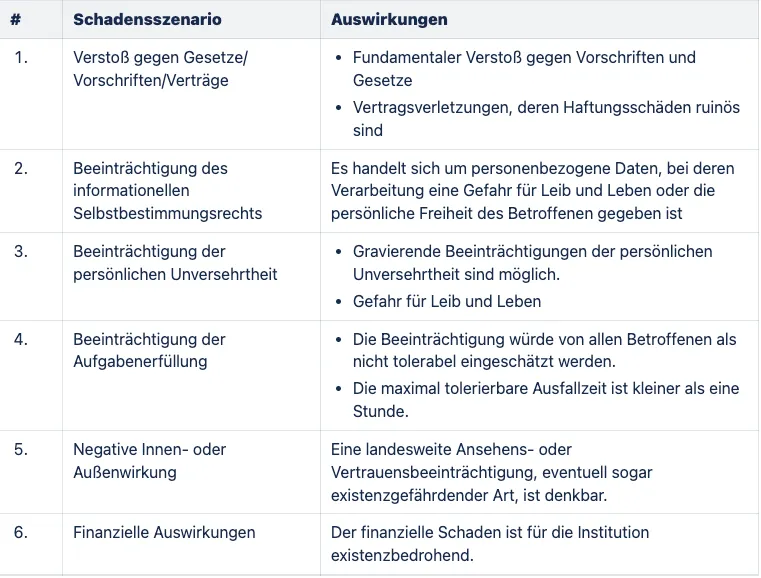
3. Implementation phase
Section titled “3. Implementation phase”3.1 Determining protection requirements for business and control processes
Section titled “3.1 Determining protection requirements for business and control processes”First, determine the protection requirements for the business processes recorded during the structural analysis. This means that for each business process, using the categories defined above, you must determine how great the need for confidentiality, integrity, and availability is.
To properly determine the protection requirements, the management of the responsible department should be involved in the process.
-
In the dropdown menu, you can set the protection requirement category, for example, confidentiality: high.
-
Below that, describe the determination of the protection requirements, using your previously defined damage scenarios.
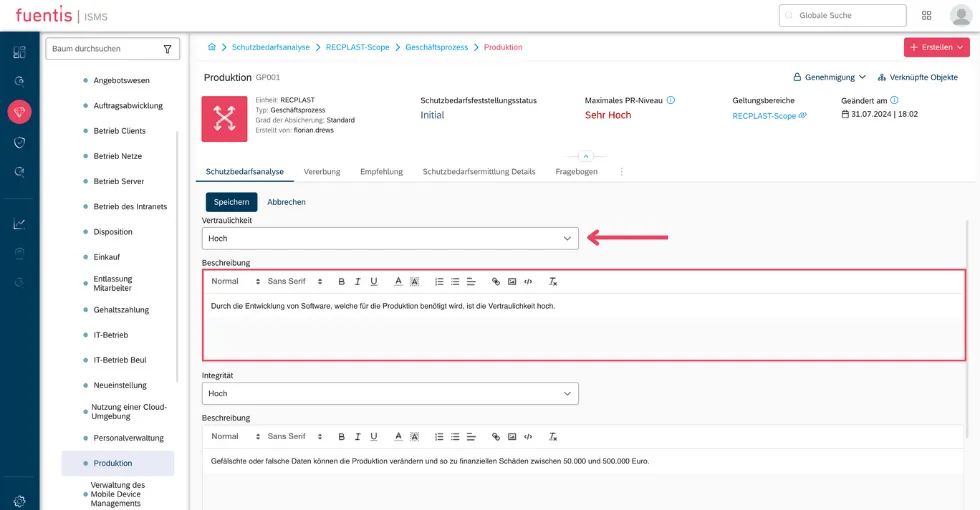
To standardize this process, you can also use questionnaires, i.e., assign them. You can do this in the “Questionnaire” tab.
Practical tip: The fuentis Suite combines important and powerful features to simplify and automate the determination of protection requirements. Use the inheritance or recommendation function for this. If you have any questions, feel free to contact us at any time or check our Service Hub for further assistance.
3.2 Determining protection requirements for applications
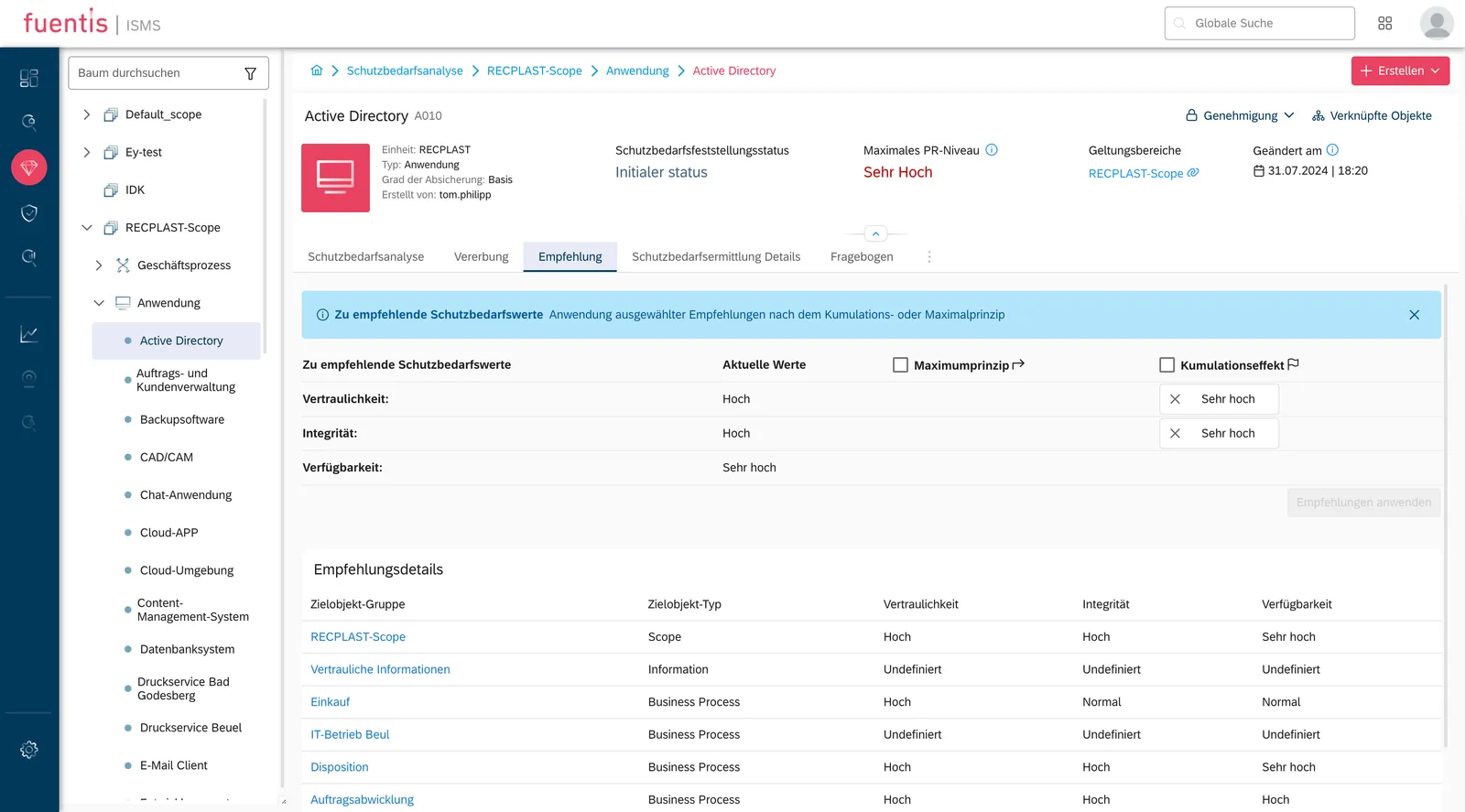
Section titled “3.2 Determining protection requirements for applications”An application’s protection requirement essentially depends on the protection requirements of the business processes for which the application is needed. This protection requirement is inherited by the applications. The following cases can be distinguished in inheritance:
- Maximum principle: In many cases, the highest protection requirement of all business processes for which the applications are relevant can be adopted.
- Aggregation effect: The protection requirement of the application can be higher than the protection requirement of the individual business processes. This is the case, for example, when an application is required for several business processes with normal protection requirements. The failure of one of these business processes might be tolerable for Beispiel GmbH. However, if several business processes fail at the same time, high damage can occur.
Set protection requirements for applications using the maximum principle and aggregation effect:
Apply inheritance of protection requirements to linked target objects:
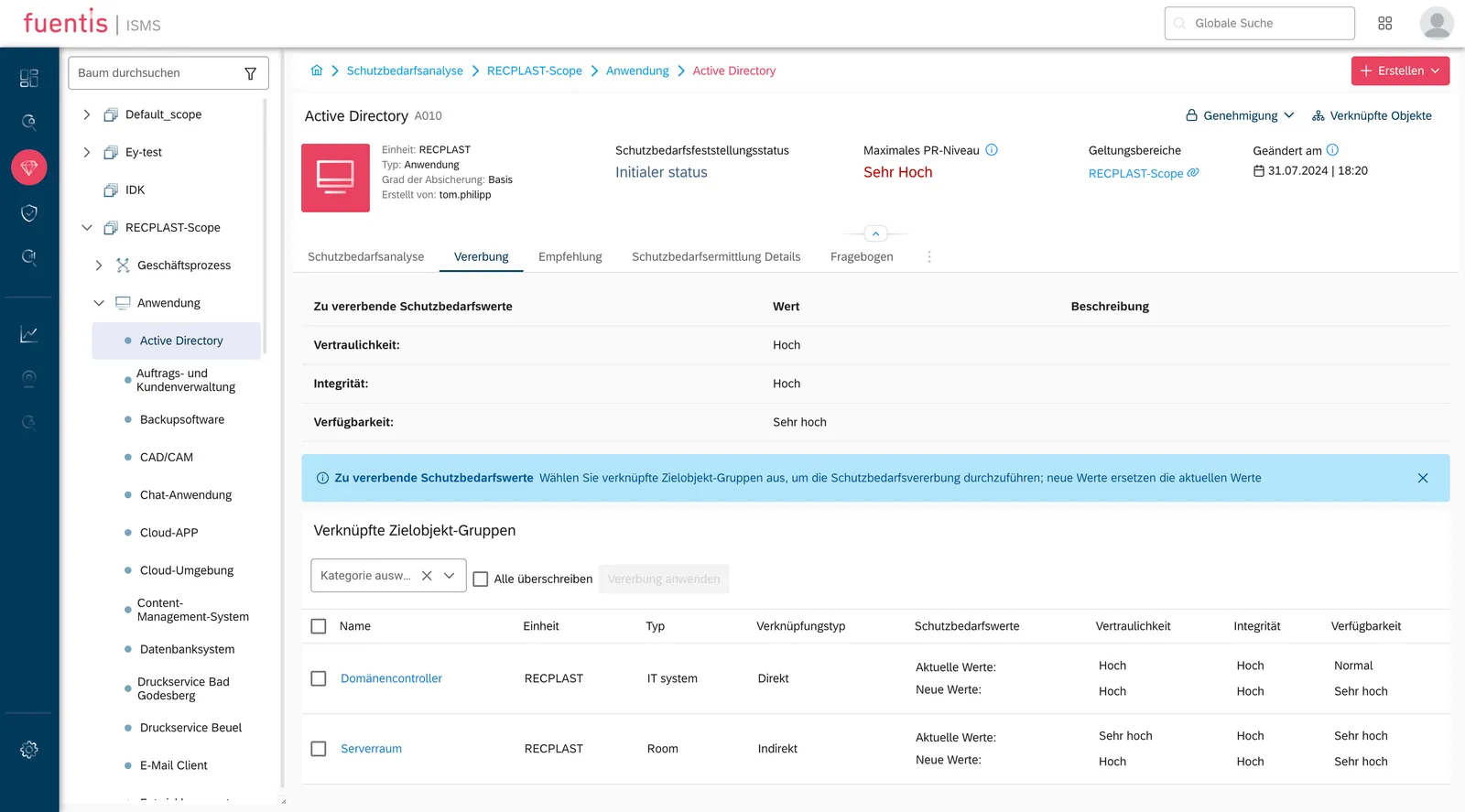
Manual determination as in 2.1 is also possible.
3.4 Determining protection requirements for IT systems
Section titled “3.4 Determining protection requirements for IT systems”An IT system’s protection requirement essentially depends on the protection requirements of the applications for whose execution it is needed. This protection requirement is inherited by the IT system’s protection requirement. Here, you can again rely on the maximum principle or the aggregation effect as a recommendation.
3.5 Determining protection requirements for communication
Section titled “3.5 Determining protection requirements for communication”In the next work step, the aim is to determine the protection requirements for the communication links. Some connections are more vulnerable than others and must be protected by redundancy or special measures against attacks from outside or inside. Critical connections include:
-
Connections that extend from the company into a public network (e.g., telephone network, internet) or across public grounds. Through such connections, malware can be introduced into the company network, company servers can be attacked, or employees can forward confidential data to unauthorized parties.
-
Connections over which particularly sensitive information is transmitted. Possible threats include eavesdropping, deliberate manipulation, and fraudulent misuse. Outages of such connections are particularly critical for applications that require high availability.
-
Connections over which confidential information must not be transmitted. For example, personnel data may only be viewed and processed by employees of the HR department. It must therefore be prevented that this data can be viewed by unauthorized employees during transmission.
For each of these connections, determine the protection requirements for the three core values based on the information transmitted over them.
3.6 Determining protection requirements for rooms
Section titled “3.6 Determining protection requirements for rooms”When determining protection requirements for rooms, consider all rooms and sites identified in the structural analysis that are relevant to the information, business processes, applications, and IT systems of the information network under consideration.
Here, inheritance principles must again be taken into account. The protection requirement of a room is measured by the protection requirements of the IT systems located in it, as well as the information and data carriers processed and stored in it. Consequently, in most cases, the maximum principle can be applied again (comparable to determining the protection requirements of IT systems).
In some cases, however, the large number of objects located in a room results in a higher protection requirement in one of the core values than for each individual object (aggregation effect). This can apply, for example, to rooms containing mirrored servers with normal availability requirements—in the event of failure of one server, there is still a second one, whereas the “failure” of the room (for example, due to a fire) affects both servers.
Modeling
Section titled “Modeling”1. Modeling according to the building block model
Section titled “1. Modeling according to the building block model”In the third step—modeling—the results of the structural analysis and the analysis of protection requirements are transferred into a structured model. This model serves to reduce the complexity of the IT landscape and provide a clear basis for the risk analysis.
Modeling can include various organizational processes, applications, and IT systems.
Modeling identifies relevant building blocks for the individual target objects. The building blocks describe requirements for ensuring information security and suitable measures. Modeling thus enables a pragmatic and effective approach to achieving the desired level of security.
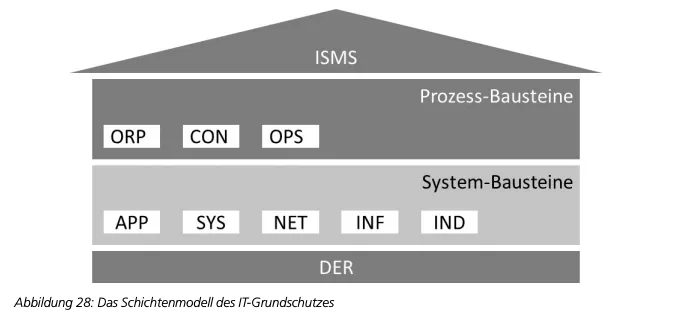
2. Where can the building blocks be found and which ones exist?
Section titled “2. Where can the building blocks be found and which ones exist?”You can find the building blocks in the IT-Grundschutz Compendium (GSK). The current version of the IT-Grundschutz Compendium can be downloaded from the BSI web server or purchased from Bundesanzeiger Verlag.
3. When should an additional risk analysis be carried out?
Section titled “3. When should an additional risk analysis be carried out?”For target objects with high protection requirements. In this case, the BSI requirements are no longer sufficient, as they are geared towards a normal protection requirement.
4. Assign building blocks with fuentis
Section titled “4. Assign building blocks with fuentis”You can easily assign the building blocks in the fuentis tool. By assigning the building blocks, the associated measures, requirements, and threats are also assigned to the target object.
5. When is a building block applicable?
Section titled “5. When is a building block applicable?”Each GSK building block describes the application area and boundaries in detail. If no building block fits or deviations exist, this must be documented.
IT-Grundschutz Check (target–actual comparison)
Section titled “IT-Grundschutz Check (target–actual comparison)”1. IT-Grundschutz Check
Section titled “1. IT-Grundschutz Check”In an initial IT-Grundschutz Check—before carrying out the risk analysis—it is determined whether and to what extent the basic and standard requirements of the relevant building blocks of the IT-Grundschutz Compendium are met for the individual target objects of an information network.
Requirements for higher protection requirements are checked in a second IT-Grundschutz Check if the security concept has been supplemented by new or changed measures as a result of decisions on risk treatment.
The overviews below also contain notes on responsibilities for each building block as well as for requirements. In addition to the responsibilities mentioned, the information security officer (ISO/ISB) should generally be involved in strategic decisions. They are also responsible for ensuring that all requirements are met and reviewed in accordance with the established security concept. Documentation of the IT-Grundschutz Check also includes information on the review process (e.g., interviewer, interviewees, time of the interview). These metadata are not listed below, but are nevertheless indispensable in practice for IT-Grundschutz Checks.
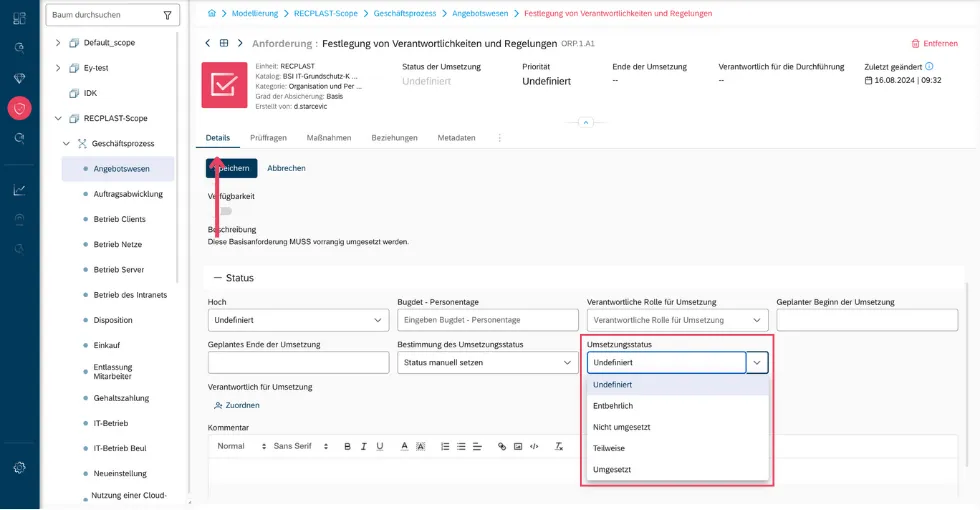
2. How should the implementation status options be selected?
Section titled “2. How should the implementation status options be selected?”- Dispensable: the requirement cannot be fulfilled
- Implemented: the requirement is fully (or with only marginal improvements) met
- Partially implemented: essential aspects of the requirement are met; individual aspects have not been fully implemented
- Open: the requirement is not or only marginally met
In the Details tab of a requirement, status and contents can be edited.
3. What must be considered when documenting the implementation status?
Section titled “3. What must be considered when documenting the implementation status?”The implementation status must be recorded in a traceable manner:
-
For every dispensable requirement, it must be comprehensible why it is dispensable:
-
Are the conditions not applicable? (For example, disabling microphones on a server is dispensable if no microphones are installed.)
-
Have equivalent or better measures been implemented? (For example, use of TLS for transport encryption if a SINA VPN with “Geheim” approval is already used.)
-
Is implementation no longer economically justifiable? (For example, if the implementation time is 6 months but the component’s remaining lifecycle is 3 months.)
-
-
For every implemented measure, the implementation should be traceable:
-
Where is the implementation specified?
-
How is implementation evidenced? (For example, an invoice.)
-
-
For every open measure, tasks must be recorded in a traceable manner:
- What still needs to be done? (SMART)
-
For every partially implemented measure, tasks must be recorded in a traceable manner:
-
How up to date is the implementation?
-
What still needs to be done? (SMART)
-
4. What is SMART?
Section titled “4. What is SMART?”Specific – Precise wording
Measurable – Defined measurability criteria
Activating – Engaging
Realizable – Realistically achievable
Timeable – Ability to set a fixed completion date
5. Degree of safeguarding
Section titled “5. Degree of safeguarding”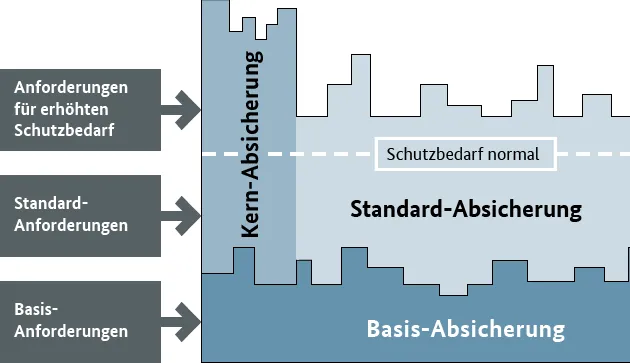
The building blocks contain three types of requirements: basic, standard, and requirements for increased protection needs. Which of these requirements you consider in the IT-Grundschutz Check depends on the organization’s requirements:
-
With the basic safeguarding approach, you check only the fulfillment of the basic requirements. Important: An attestation can be issued, but not a certification.
-
With the standard safeguarding approach, IT-Grundschutz is fully implemented, with all assets included. Protection requirements are determined comprehensively and risk analyses are carried out completely. Certification is possible.
-
With core safeguarding, the focus is on the most valuable and exposed resources, with the goal of fully safeguarding a specific core area. Certification is possible.
Risk analysis
Section titled “Risk analysis”In the risk analysis, the remaining risks after the IT-Grundschutz Check are assessed. The goal is to define appropriate measures to reduce or accept remaining risks.
Note: You will find further information on risk analysis in the Knowledge section!
Procedure
Section titled “Procedure”- Identify risks that remain after the IT-Grundschutz Check.
- Assess their likelihood of occurrence and potential damage.
- Decide whether the risk will be accepted, reduced, or avoided.
- Document the results in fuentis under “Risk Management.”
Practical tip: In fuentis, risks can be linked directly to target objects and measures. Use the “Risk Treatment” workflow to create tasks automatically.