

Scoping RoPAs and processing activities
Two questions come up almost immediately when starting with the DPMS, and neither can be answered by looking at the interface.
- How many registers do I create, and what do I scope them by?
- What exactly do I enter as a processing activity?
This page answers both. Getting them wrong at the start produces a register that can only be restructured later with considerable effort.
Scope registers by responsibility
Section titled “Scope registers by responsibility”A RoPA (register of processing activities) is an organizational bracket. The rule of thumb:
One register per area of responsibility, not per system, application or database.
In practice that usually means one register per department or business unit, each with a responsible person.
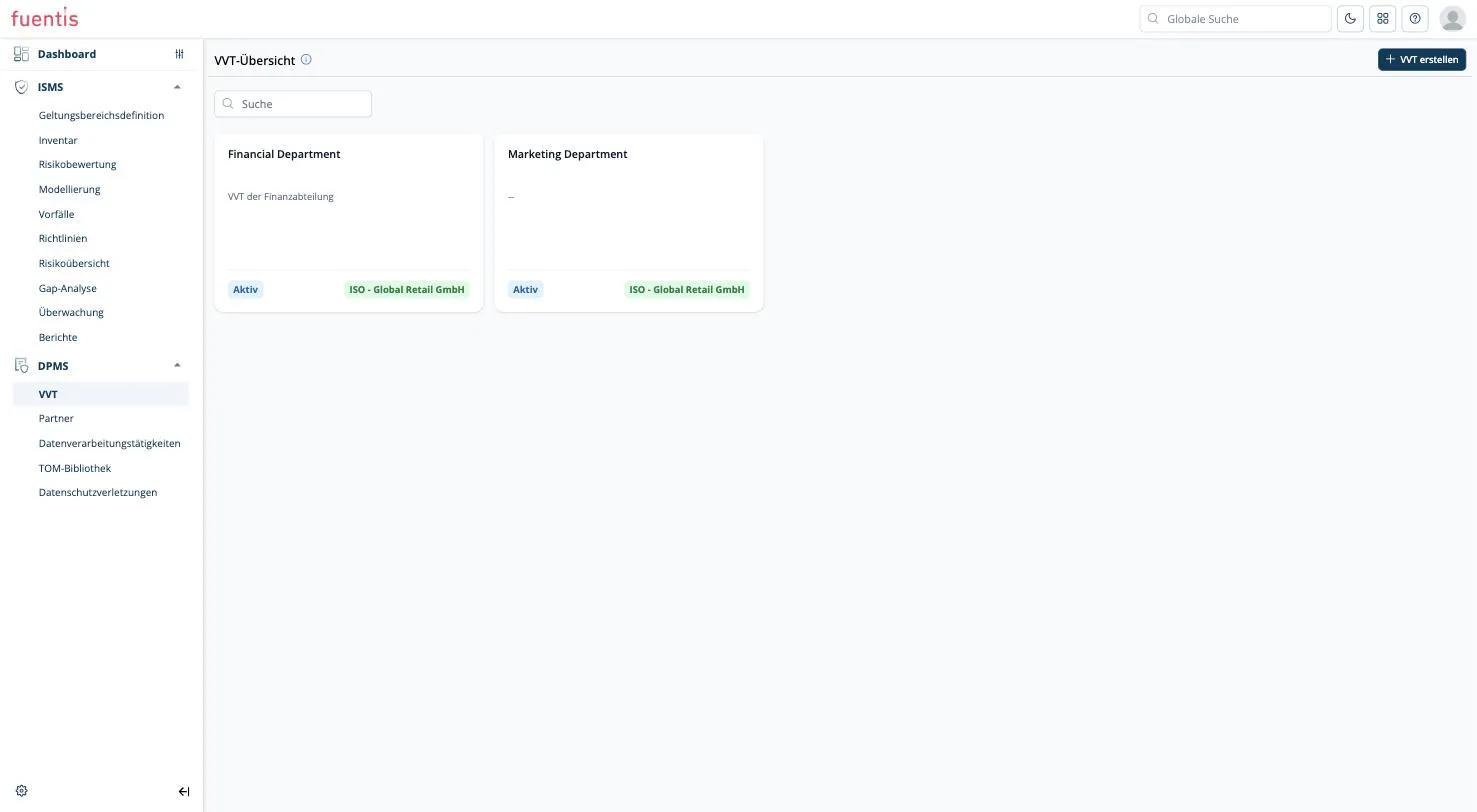
In the example above there are two registers: one for the finance department, one for marketing. Both belong to the organizational unit ISO - Global Retail GmbH. The marketing register may look entirely different from the finance one: marketing might outsource much of its processing and rely heavily on data processing agreements, while finance processes everything in-house.
Why not put everything in one register?
Section titled “Why not put everything in one register?”Technically nothing stops you: you can put all processing activities of an organization into a single register. It is not the intended design, however, and in practice it backfires quickly:
- Responsibility blurs. A register has exactly one responsible person. In a catch-all register that is inevitably someone who does not know the details of the individual areas.
- Reviews become unwieldy. A department reviews its own processing activities far more reliably than a central function reviews one long mixed list.
- Agreements no longer fit. Agreements are assigned at register level. In a catch-all register you end up with agreements that have nothing to do with most of the activities in it.
Fields at register level
Section titled “Fields at register level”| Block | Content |
|---|---|
| Basic data | Name, short description, status |
| Controller information | Organization name, address, city, country, contact person with email and phone |
| DPO information | Details of the data protection officer |
Plus the tabs Processing activities and Agreements.
Note: The fields under Controller information are free-text fields and are not linked to the partner master data. With several registers you maintain the same organizational details repeatedly. Settle on the wording once and apply it consistently.
An activity is not a data collection
Section titled “An activity is not a data collection”The name says it: a processing activity. What matters is what is done with the data, not which data happens to be stored somewhere.
Wrong:
Employee bank account details
That is a data collection. It does not answer why the data exists in the first place, and so it cannot be tied to a legal basis or a purpose.
Right:
Payroll: we pay salaries and store employees’ bank details for that purpose.
Now the activity is in the foreground and the data is the means to an end. The whole module is built around that direction: purpose first, data types second.
Check whether you can phrase your entry as a sentence with a verb (“we pay”, “we transfer”, “we contact”, “we monitor”). If so, it is an activity. If all you can manage is a noun, it is a data collection and belongs in the data types of an activity.
Other typical activities: payroll, recruiting, customer support, newsletter distribution, CCTV monitoring, payment processing.
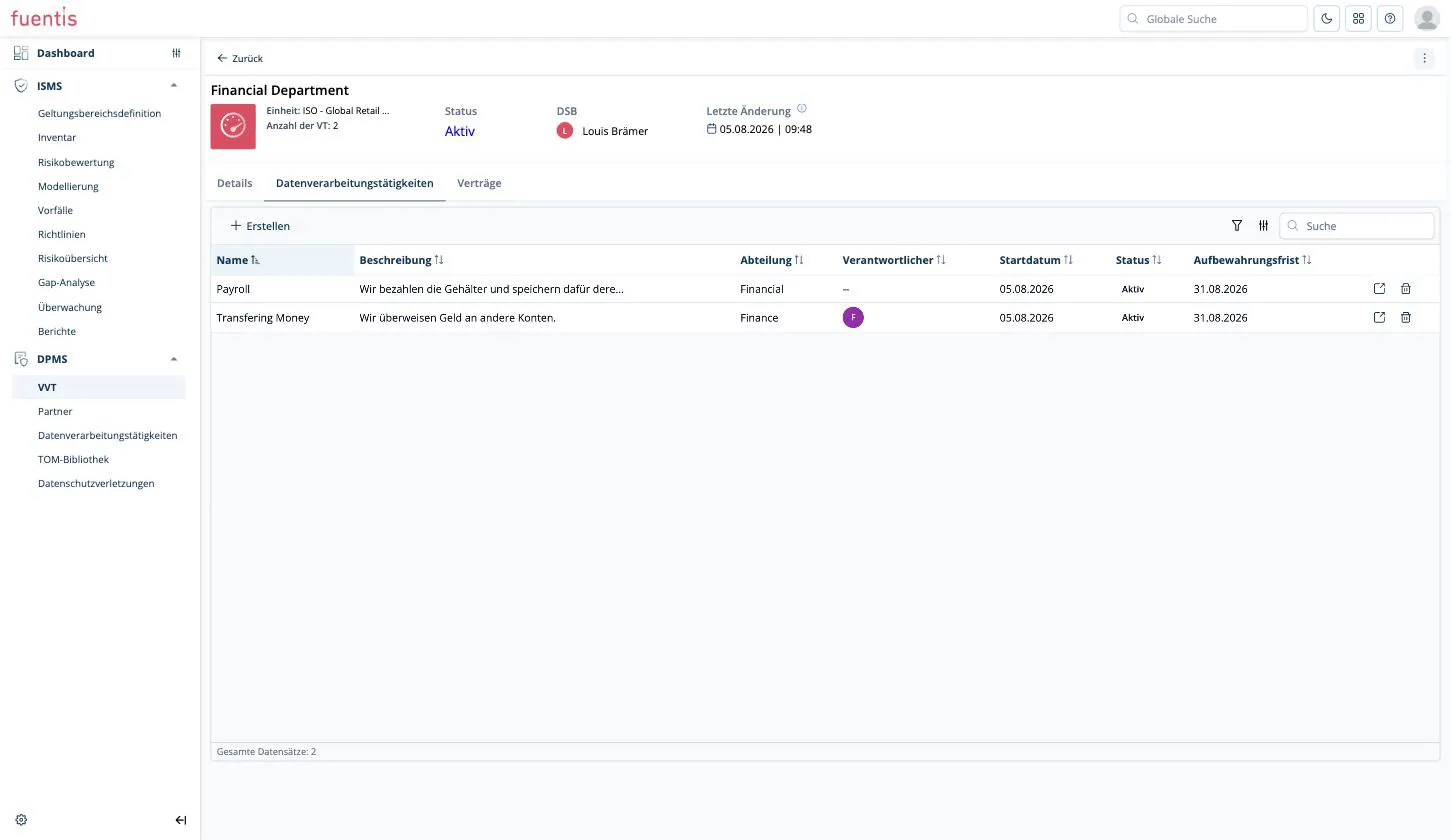
What is recorded per processing activity
Section titled “What is recorded per processing activity”Basic data
Section titled “Basic data”Name, description, status, start date, retention period, department and responsible person.
The description is mandatory and the best place to make the activity tangible in one sentence (see the example above).
Additional data
Section titled “Additional data”| Field | Meaning |
|---|---|
| Purposes of processing | What is the data processed for? |
| Categories of data subjects | Employees, customers, business partners, vendors … |
| Data recipients | Who gets to see the data? |
| Data source | Where does the data come from? |
Data transfers
Section titled “Data transfers”If data leaves the EU or EEA, enter per destination country: country name, country code and a justification. For the payroll example: United States / US / The payroll service is based in the USA.
The field is not mandatory. If left empty, the system assumes no third country transfer takes place.
Data types
Section titled “Data types”Here you tick which personal data the activity actually covers. The selection is grouped into five categories:
- Financial data: bank account details, credit card information, payment history, tax identification number, salary and compensation, debt and credit status, invoices and billing data, insurance data
- Online identifiers: IP address, device identifiers, login credentials
- Personal data: name, address, date of birth, phone number, email address, gender, nationality, marital status, employment data, education data, photographs
- Sensitive data: racial or ethnic origin, political opinions, religious beliefs, health data, sexual orientation, genetic data, biometric data, criminal records and offences, social welfare data, national identification numbers, trade union membership, children’s data
- Location data: GPS location
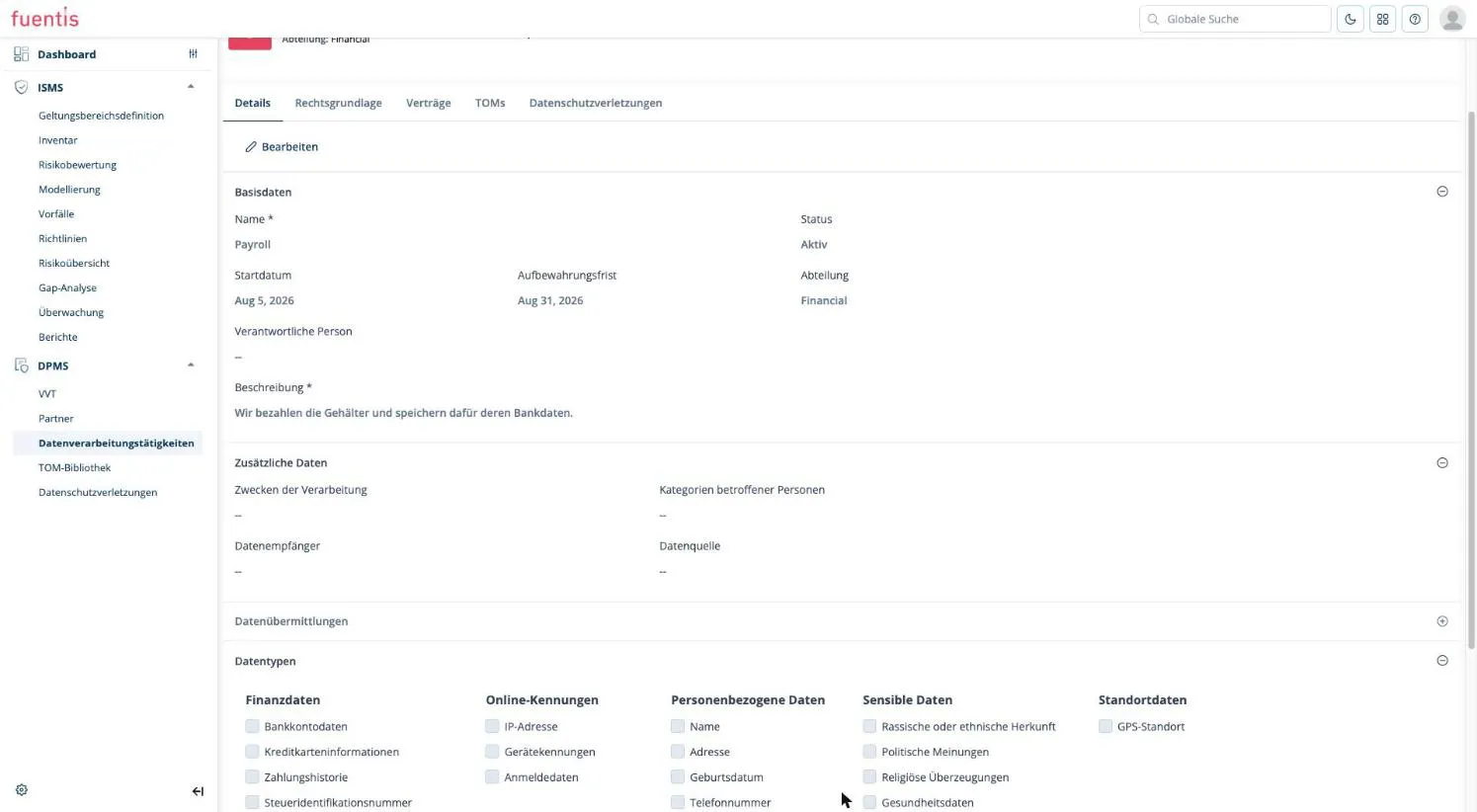
Caution: The sensitive data category corresponds to the special categories under Art. 9 GDPR. As soon as anything is ticked here, further obligations follow: you must document the legal basis particularly carefully and provide appropriate safeguards. So only tick what is genuinely processed, and in that case maintain the legal basis completely.
It also matters in the event of a data breach: if sensitive data categories are affected, the system classifies notification of the supervisory authority as mandatory.
Legal basis, agreements and TOMs
Section titled “Legal basis, agreements and TOMs”Besides Details, every processing activity has four more tabs:
- Legal basis: assignment of an Article 6 (a) to (f) GDPR, each with its own description of how you concretely fulfil that basis. As long as nothing is assigned, a permanent notice states that the legal basis per Art. 6 GDPR must be documented.
- Agreements: assignment of the agreements stored with the partner, see Partners, agreements and responsibilities.
- TOMs: assignment from the TOM library or creating your own measure directly.
- Data breaches: read-only list of the incidents assigned to this activity, see From security incident to data breach.
Operational work happens throughout at processing activity level. The register holds it together, nothing more.
Practice tip: If the tabs next to Details do not respond or stay empty after you open a record, wait a moment until the attributes in the Details tab have fully loaded. The remaining tabs work afterwards. This affects the entire application, not just the DPMS.